Alpine Linux GitLab
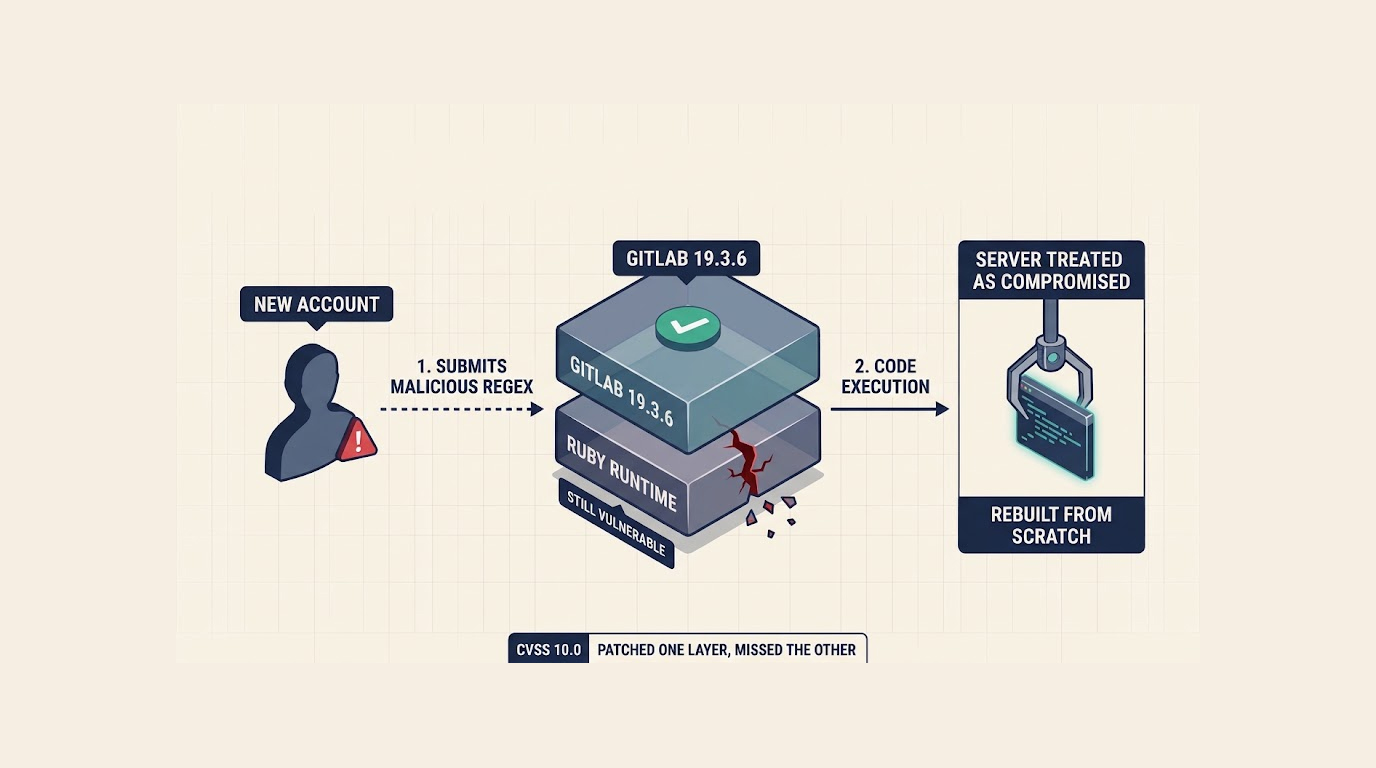
An attacker tried to exploit a critical GitLab vulnerability on the Alpine Linux project's own GitLab server just one week after GitLab released a fix, because Alpine upgraded the software but missed the underlying Ruby runtime, and the incident is a stark warning for anyone running a self-compiled GitLab installation.
The flaw is tracked as CVE-2026-97229, it carries a maximum CVSS score of 10.0, and it lets an attacker run code on a GitLab server through a crafted regular expression in a CI configuration. Alpine found no evidence that the attack worked, but it cannot rule it out, so it rebuilt the server from scratch and reset every account's password.
The Upgrade That Wasn't Enough
Quick Security Checklist
- Scan your system or website
- Update all dependencies
- Change passwords
- Enable 2FA
Here is the painful lesson from this incident: upgrading GitLab is not always enough.
GitLab's fix is a set of patches to the Ruby that GitLab ships in its own packages and container images. But Alpine's GitLab image used standard Ruby, so upgrading the server to GitLab 19.3.6 on October 22 did not actually fix the flaw.
For anyone running GitLab on their own Ruby, whether built from source or in their own container image, Alpine was blunt: "upgrading GitLab is not enough." Those servers also need Ruby 3.3.13, 3.4.12, 4.0.9 or later, and users of Alpine's alpinelinux/gitlab image need to pull 19.3.6 again.
How the Attack Unfolded
The timeline here is a masterclass in operational mistakes and lucky breaks.
- October 13: Alpine upgraded the server to GitLab 19.3.4 instead of 19.3.5, which it calls a mistake.
- October 20-21: A newly registered account began probing the server, sending crafted CI configurations. They crashed GitLab worker processes 8 times, and the main attack on October 21 also caused 502 errors and caused CI jobs to fail.
- October 23: Alpine blocked the account.
- October 25-26: The attacker came back and tried to get back in, but those attempts failed.
- October 26: Alpine found that the server was still vulnerable after its October 22 upgrade to 19.3.6.
- October 27: Alpine closed GitLab to everyone except its developers and build servers and started rebuilding it.
In 4 of those crashes, the attacker got partway through the exploit and failed at the next step, according to Alpine. The attacker also downloaded Alpine's GitLab container image, which Alpine said "suggests they were tuning the exploit to our exact build."
What Alpine Can and Cannot Rule Out
Alpine found no sign that the attacker's code ran on the server. Timing probes showed no delays, there were no unexpected files, keys, hooks, or processes, and no private data was sent back to the attacker via any web or API request that Alpine can see.
It cannot be sure, though. "A successful exploit would leave no crash and no trace in the web logs," Alpine said. Some logs from the attack day are gone, including background job logs and the old container's filesystem, and neither Alpine nor its hosting provider logged outbound network connections.
Because the evidence needed to confirm code execution no longer exists, Alpine treated the server as compromised and rebuilt it to remove any foothold a successful exploit could have left.
If the attack succeeded, these could have been exposed:
- Email addresses, names, and IP addresses of all users
- Password hashes
- 2FA secrets, CI/CD variables and runner tokens
- Webhook, integration and push mirror credentials
- Personal access tokens, which are stored as hashes
- Private repositories, and confidential issues and merge requests
Beyond the password reset and the new secret keys, Alpine has not said whether runner tokens, CI/CD variables, access tokens or integration credentials stored on the server have been replaced.
How to Fix CVE-2026-97229 on Your GitLab Server
Which release fixes a server depends entirely on how GitLab is installed.
|
Installation Type |
What You Need to Do |
|
GitLab's Linux package or official container images |
Upgrade to the newest release for your branch (19.5.1, 19.4.3, 19.3.6, 19.2.9, 19.1.9, 19.0.10, or 18.11.13). |
|
Self-compiled installs, or images that install their own Ruby |
Upgrade GitLab AND update Ruby to 3.3.13, 3.4.12, 4.0.9, or later. Ruby 3.2 will not receive the fix, so servers running 3.2 need to upgrade. |
GitLab's advisory named 19.3.4 as the fixed version for the 19.3 branch when it was published on October 12. It now names 19.3.5 and lists 19.3.4 as affected, so servers still on 19.3.4 should move to 19.3.6.
If a server cannot be upgraded right away, Rapid7 suggests restricting anonymous access to public projects, stopping untrusted users from creating or writing to public projects, or blocking the CI lint route. Those steps cover only Rapid7's exploit route and do not fix the vulnerable regular expression compiler.
What Alpine Users Should Do
Account holders will need to set a new password with "Forgot your password?" on the sign-in page when gitlab.alpinelinux.org reopens, Alpine said. It has also seen automated login attempts against its GitLab using passwords leaked from other sites, and anyone who used their gitlab.alpinelinux.org password elsewhere should change it there.
Users of the alpinelinux/gitlab image should pull alpinelinux/gitlab:19.3.6 again. The image published on October 27 contains Ruby 3.3.13, while any 19.3.6 image pulled before then, and every older tag, is vulnerable.
Alpine's own Ruby packages already have the fix: Ruby 3.4.12 on Alpine 3.22, 3.23, 3.24 and edge, and Ruby 3.3.13 on Alpine 3.21. Running apk upgrade installs it.
FAQ
What is CVE-2026-97229?
It is a critical (10.0 CVSS) flaw in Ruby's Onigmo regular expression engine. If an attacker can control the regex input in a GitLab CI configuration, they can potentially run code on the server.
Why didn't upgrading GitLab fix the Alpine server?
Because Alpine's GitLab image used standard Ruby, not the patched Ruby that GitLab bundles in its own packages. Upgrading GitLab does not change the server's own Ruby runtime.
Was the Alpine Linux GitLab server actually compromised?
Alpine found no evidence that the attacker's code ran, but it cannot rule it out because some logs from the attack day are gone. The server was treated as compromised and rebuilt from scratch.
Do I need to update Ruby if I use GitLab's official container images?
No. GitLab's official container images and Linux packages ship with the patched Ruby. You only need to update Ruby separately if you are running a self-compiled install or a container image that installs its own Ruby.
What should I do if I can't upgrade immediately?
Rapid7 suggests restricting anonymous access to public projects, stopping untrusted users from creating or writing to public projects, or blocking the CI lint route. These are temporary mitigations, not a complete fix.