
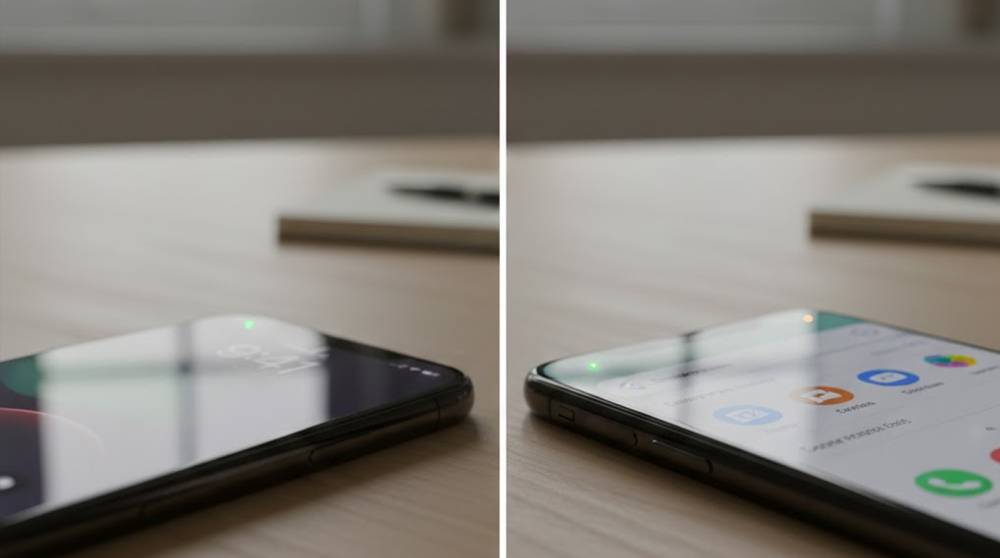
On both iOS and Android, there is a built-in privacy feature of your phone that is indicated by the tiny orange or green dot (or box) located in your status bar. When an app accesses your microphone, it will show up as an orange dot; when an app accesses your camera, it will show up as a green dot (a green dot may also represent the use of a microphone if both are used).
1. iOS (iPhone/iPad, since iOS 14): Orange = microphone in use; green = camera (or camera + mic). It often appears in the Dynamic Island on newer models or as a dot near the top-right.
2. Android (varies by version and manufacturer, common since Android 12+): Orange or similar indicator for mic; green for camera. Some devices show it near the battery icon or in the quick settings shade.
These dots are meant to give transparency, Apple and Google added them to combat hidden spying. But when they light up without an obvious reason (no call, no voice memo, no video chat), it can feel alarming.
Common Legitimate Reasons for Unexpected Activation
Most cases are harmless background activity:
1. Background app processing (for example, voice recorder applications, podcast players, or video conferencing services such as Zoom and WhatsApp) that may leave the microphone on for a brief period of time after they are no longer actively running.
2. Voice assistant trigger words such as "Hey Siri" on iOS devices or "OK Google" on Android devices may be triggered inadvertently either by chance noises or friction in your pocket or because something sounded like a trigger phrase was said when it was not.
3. Using dictation and keyboard features may also cause the microphone to be triggered for such purposes as using the mic icon on the keyboard, however briefly or using the auto dictation feature included with many messaging apps.
4. Depending on the application you are using or one of your device's built-in functions, microphones may be checking for audio inputs periodically (i.e. they have been designed to look for sound because of the active noise cancellation, or simply because the microphone is always on and listening for whatever it picks up).
5. Other examples are bugs found in the latest iOS and some Android devices including an error where the dot remained (indicating the microphone was in use) after the microphone had been turned off. These bugs were corrected in early 2026.
6. Examples include live transcribing, analyzing background sounds used for notification, as well as any number of different Operating System services typically aimed at providing accessibility to users or analyzing sounds in general all can activate for short bursts as well.
Concerning Scenarios: When to Investigate
If the dot appears frequently with no app in use, especially during quiet moments (e.g., phone idle on desk), consider these possibilities:
1. There could be an untrustworthy or harmful app that accidentally allows the microphone to be turned on. If you install any new applications, check to see if any of your new applications that are social-media-oriented, VPNs, or "cleaning" apps have access to your microphone.
2. Another possibility is that there is spyware or stalkerware installed on your phone. Advanced threats like Pegasus, though not common for the average user, can have silent access by utilizing older exploit techniques, yet most of the capabilities of modern iOS and Android devices have added more security measures to make this silent access more difficult. Note that a combination of unexpectedly seeing dots and experiencing excessive battery drain, high temperatures (overheating), or unusually high levels of data usage should all be considered as warning signs for spyware/stalkerware.
3. You may have forgotten that you gave an app permission to access the microphone for purposes such as giving "voice commands" or detecting "sound".
4. You may have installed malware (APK from unknown sources on Android) by side-loading or by jail-breaking your device (currently the only way to get an iOS device without Apple’s guidelines). Malware can also cause your device to function normally while having access to your microphone and turn the microphone on out of your view (behind the screen).
Real-world examples from 2025–2026 reports:
1. One user reported that during idle time he saw the orange dot because the podcast app he was listening to in the background began playing again or that Siri misheard a noise in the background from the ambient noise and activated.
2. Some iOS 18 bugs caused persistent dots post-call; restarting or updating fixed it.
3. Rare spyware cases (targeted at high-profile individuals) used mic access, but indicators usually appeared unless exploits patched the dot.
What to Do If It Happens Unexpectedly
1. Swipe down (or go into “Control Center” on iOS) then tap on the dot/icon, which will tell you what app is currently accessing the microphone/camera.
2. You’ll need to revoke permission for the app in question: For iOS: go to Settings > Privacy > Microphone; For Android: go to Settings > Apps > Permissions > Microphone. Turn “Off” permission for the app you suspect is responsible for this.
3. Check your most recently used applications: On iOS, use an App Privacy Report (Settings > Privacy & Security); For Android, use the Privacy Dashboard. This will show you all recent activity regarding app usage.
4. Force closing apps or restarting your smartphone/device, you're going to remove most of the glitches from the phone operating in the background.
5. Update both iOS and your applications, usually, those updates include patches to fix bugs, issues and vulnerabilities found by the Apple and the App Store.
6. Scan for issues (use built-in tools; e.g., Google play protect on Android) or reputable malware protection (e.g., Malwarebytes, etc.). If you have concerns about spyware, you should consider contacting a professional for assistance or performing a factory reset (BACK UP everything before doing this).
These indicators are one of the best everyday privacy tools, pay attention to them. In most cases, it's benign background behavior, but unexpected activations are worth a quick check.


