Avast unquoted service path vulnerability
A well-known privilege escalation vulnerability has been detected by a researcher in a long-used antivirus application. This flaw can allow any local user with limited rights to execute code using a privilege of SYSTEM.
The vulnerability in question relates to an unquoted service path in the SecureLine feature of the Avast Antivirus v. 25.11. The researcher who disclosed this vulnerability was Milad Karimi (Ex3ptionaL). The vulnerability occurs specifically in how Microsoft Windows operates with the service binary path for the SecureLine service.
If you have the AVAST Antivirus product installed and are also utilizing the SecureLine VPN, then any local user could take advantage of this vulnerability to gain complete control of your computer.
What is an Unquoted Service Path Vulnerability?
In order to understand Avast’s unquoted service path vulnerability, you must first understand unquoted service paths and their dangerous nature.
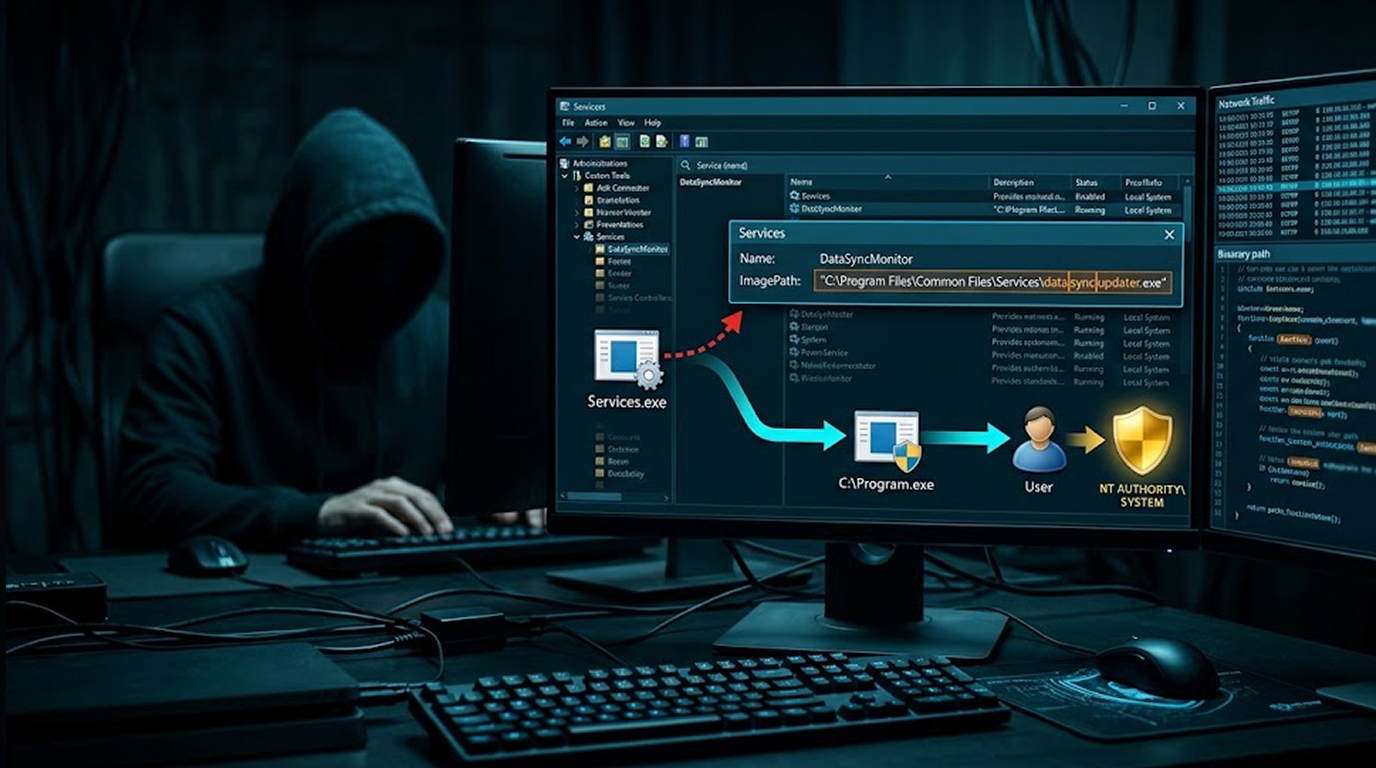
Windows services have a binary path that tells the OS which executable to execute when the service starts. If that path has any spaces in it and it isn't contained in quotes, Windows follows a specific order when resolving the path to the executable.
Let’s use the following example to illustrate this point: C:\Program Files\AVAST Software\SecureLine\VpnSvc.exe
If you have the following path (which contains spaces) to your executable in C:\Program Files\AVAST Software, without quotes around the path; Windows will attempt to resolve that path by looking for the executable in the following order:
1. C:\Program.exe
2. C:\Program Files\AVAST.exe
3. C:\Program Files\AVAST Software\SecureLine\VpnSvc.exe
If an attacker can write a malicious executable named Program.exe or AVAST.exe to the C:\ or C:\Program Files\ directory, Windows will run that malicious code instead of the legitimate Avast service. And here is the kicker: the service runs with SYSTEM privileges.
The Avast unquoted service path vulnerability means exactly this scenario is possible.
The Vulnerable Service
Karimi identified that the Avast unquoted service path vulnerability exists in the SecureLine service. Running the standard Windows sc qc command reveals the problem:
NOMBRE_SERVICIO: SecureLine
NOMBRE_RUTA_BINARIO: C:\Program Files\AVAST Software\SecureLine\VpnSvc.exe
NOMBRE_INICIO_SERVICIO: LocalSystem
Notice the binary path: C:\Program Files\AVAST Software\SecureLine\VpnSvc.exe
The path contains spaces. The path is not quoted. The service runs as LocalSystem (SYSTEM).
That is the trifecta for an unquoted service path attack.
How the Exploit Works
The Avast unquoted service path vulnerability can be exploited by any authenticated local user, even one with no special privileges.
Step 1: Find the vulnerability: An attacker will check if the SecureLine is running by running sc qc SecureLine or checking the unquoted service path in the Windows Registry.
Step 2: The attacker will identify all writable folders along the completed path or through all the directories that exist for non-administrator accounts, key locations like C:\ and C:\Program Files\ may be writable depending on system configuration.
Step 3: Drop A Malicious Executable: The attacker will write an executable binary with the same name as the first unquoted directory in Program.exe in C:\ or AVAST.exe in C:\Program Files\.
Step 4: Wait For The Service To Restart: The flaw is activated each time the SecureLine service is started. The service will be restarted when the operating system boots, either by an attacker forcing the system to reboot, or when there is a system crash.
Step 5: At this point, the malicious person has system permissions. The unquoted path results in running "Program.exe" or "AVAST.exe" instead of "VpnSvc.exe". LocalSystem runs the service so that the malicious program runs with system permissions. Therefore, with Avast’s unquoted service path issue, an attacker has total control of the victimized computer.
Why This Matters
You might say "To use this, an attacker would require access to the system. Is that really so great of an issue?"
The Avast unquoted service path vulnerability is a huge issue because it gives an attacker local privilege escalation, which is the first step for an attacker to gain access to a user-level account.
When the attacker first gets access to the system, they usually have low privileges and are often given limited access to the files on the system. Many attacks begin with a phishing email, malicious document, or drive-by download that gives the attacker a foothold as a standard user. The Avast unquoted service path vulnerability turns that low-privileged foothold into SYSTEM-level control.
Shared environments are at risk.
On university labs, corporate workstations, or public computers, multiple users share the same machine. Any local user could exploit the Avast unquoted service path vulnerability to elevate to SYSTEM and access other users' data.
Persistence is easily accomplished.
Once an attacker reaches SYSTEM level through exploitation of this vulnerability, they can add backdoors, deactivate security applications, and create permanent access to the system.
Affected Products Versions
The unquoted service path vulnerability present in AVAST Antivirus version 25.11 upon the Windows 11 operating system. The vulnerable service is SecureLine, Avast's VPN component. The binary path is:
C:\Program Files\AVAST Software\SecureLine\VpnSvc.exe
Other versions of Avast may also be affected if they install the SecureLine service with an unquoted path containing spaces. Older Windows versions (10, 8, 7) are likely vulnerable as well, though the researcher tested on Windows 11.
How to Verify if You Are Vulnerable
You can check for the Avast unquoted service path vulnerability yourself.
Open an elevated command prompt (as Administrator) and run:
sc qc SecureLine
Look for the BINARY_PATH_NAME line. If the path contains spaces and is not surrounded by double quotes, you are vulnerable.
A safe, quoted path would look like this:
BINARY_PATH_NAME: "C:\Program Files\AVAST Software\SecureLine\VpnSvc.exe"
An unsafe, unquoted path, the Avast unquoted service path vulnerability looks like this:
BINARY_PATH_NAME: C:\Program Files\AVAST Software\SecureLine\VpnSvc.exe
How to Fix the Vulnerability
If you are running AVAST Antivirus 25.11 with SecureLine, you should take action immediately.
Option 1: Update Avast.
Check for the latest version of AVAST Antivirus. The vendor may release a patch that quotes the service path. The Avast unquoted service path vulnerability is a configuration issue, not a code bug, so a patch can fix it without changing the binary.
Option 2: Manually quote the path.
If you have administrative access, you can fix the Avast unquoted service path vulnerability yourself. Open an elevated command prompt and run:
sc config SecureLine binPath= "\"C:\Program Files\AVAST Software\SecureLine\VpnSvc.exe\""
Note the spaces, quotes, and the space after binPath=.
Option 3: Limit Writable Locations
You must ensure that users without administrative privileges do not have Write Access to C:\ or C:\Program Files\. The unquoted Service Path Vulnerability only has the potential to be exploited if the attacker is able to place a malicious executable in one of these directories.
Option 4: Disable SecureLine if not being utilized.
If you are not utilizing the VPN service offered by Avast, then disable the SecureLine service entirely. Set its startup type to Disabled using the Services console or sc config SecureLine start= disabled.
Responsible Disclosure Status
Karimi discovered the Avast unquoted service path vulnerability and reported it to the vendor.
At the time of this writing, users are advised to apply the manual fix or check for vendor updates. The Avast unquoted service path vulnerability is a known and repeatable local privilege escalation vector.
Final Thoughts
The Avast unquoted service path vulnerability is not a new type of bug. Security researchers have documented unquoted service path issues for over a decade. Microsoft even recommends always quoting service binary paths in their documentation.
Yet here we are in 2026, finding the same mistake in a major antivirus product from a reputable vendor.
The Avast unquoted service path vulnerability is a reminder that basic security hygiene matters. Quoting a path takes two characters: a double quote at the start and a double quote at the end. Forgetting those two characters can turn a standard service into a privilege escalation vector.
If you run Avast with SecureLine, check your service path today. Do not wait for an attacker to find it first.
FAQ Section
Q1: What versions of Avast are affected by the unquoted service path vulnerability?
The vulnerability has been confirmed in AVAST Antivirus version 25.11 on Windows 11. Any version of Avast that installs the SecureLine service with an unquoted binary path containing spaces is likely vulnerable, including older Windows 10, 8, and 7 systems.
Q2: To exploit the Avast unquoted service path vulnerability, does the attacker need to have local access to the system?
No. The vulnerability can only be exploited locally. An attacker would already have to have write permissions to the file system in order to exploit this vulnerability. The unquoted service path vulnerability is a potent escalation of privilege method to gain full control of SYSTEM from a low level account.
Q3: Does the unquoted service path vulnerability affect the entire line of Avast products?
The only definite service that has an unquoted service path is SecureLine, which is the VPN add-on to the Avast application. There may be many other services from Avast that contain unquoted service paths. You can check for similar issues by running the command sc qc for all Avast services (e.g., sc qc avast!, sc qc AvastSvc, etc.) to see if their paths are enclosed properly.
Q4: What actions should I take to determine whether I have already been exploited by someone through this vulnerability?
Look for suspicious executables with names such as Program.exe in C:\ or AVAST.exe in C:\Program Files on your PC. Examine your Windows event logs for failed service starts and for any suspicious binary execution logs. The Avast unquoted service path vulnerability will leave behind forensic traces.
Q5: Has the Avast unquoted service path vulnerability been patched?
When last disclosed, on December 17th, 2025 the vulnerability has yet to be formally patched. Users should use "sc config" command to manually quote the Service Path field and restrict write access to certain directories containing sensitive data. Refer to the Avast Security Advisories for more information regarding patching status.
Source: Exploit DB