
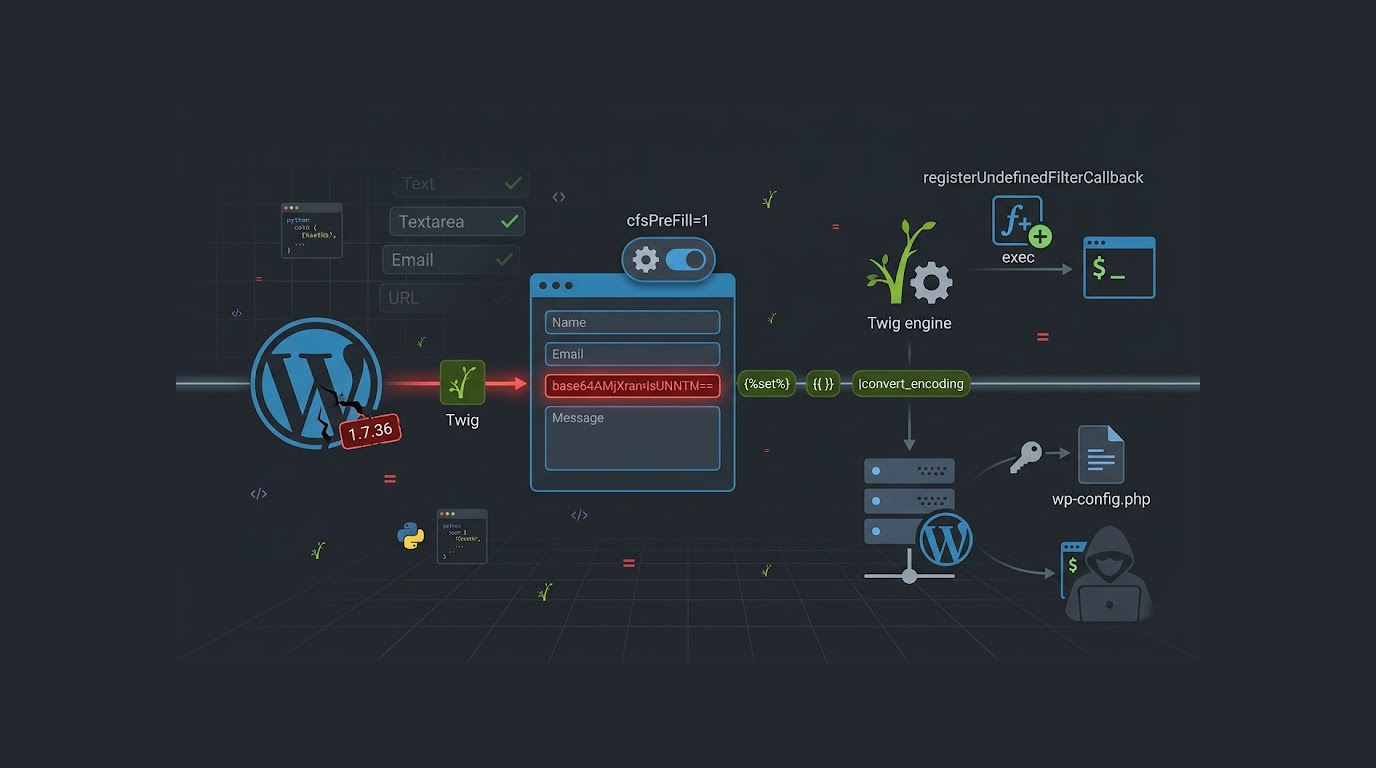
The Supsystic Contact Form plugin for WordPress contains an SSTI vulnerability that allows an attacker to run any command on the server. This vulnerability has been found in all versions of this plugin from v1.0 through v1.7.36.
The security flaw, CVE-2026-4257, in this plugin results from a failure to properly handle pre-filled form fields with Twig templates.
Security researcher bootstrapbool published a proof-of-concept exploit for the WordPress Supsystic Contact Form SSTI exploit, and the plugin has been installed on thousands of WordPress sites.
What Is Server-Side Template Injection?
Server-side template injection (SSTI) takes place when an application incorporates the user's input into templates without the necessary sanitization process and allows an attacker to add malicious code into those templates, thus leading to execution on the application server.
A vulnerability found in the Wordpress Supsystic Contact Form exploits the Twig template language used by the Supsystic Contact Form plugin. Twig is a very well known and widely used PHP-based templating language.
By injecting a Twig code snippet into a Supsystic Contact Form field, the malicious user can have their code executed on the server side when the Supsystic Contact Form plugin processes the user input into JSON format. The execution of the injected Tigris code may allow the attacker to execute arbitrary commands on the compromised website.
The Vulnerable Parameter
The Exploit, WordPress Supsystic Contact Form SSTI The cfsPreFill parameter also allows the attacker to pass in any name of a known form field and then get that value pre-filled into the provided field when a user submits a form and without doing any validation on the pre-filled value specified by the attacker.
In addition, if the attacker sets the cfsPreFill value to 1, the plugin will attempt to parse the provided field value as a Twig template, allowing for arbitrary Twig code to be executed.
The exploit works against the cfsPreFill form field types of Text, Textarea, Number, Email, Time, and URL. However, buttons and other non-input type form elements are not affected.
The Exploit Chain
The SSTI exploit against the WordPress Supsystic Contact Form uses a multi-stage Twig payload to achieve command execution.
Stage 1: Define variables for character encoding; "a" will be set to "UTF-8", "b" will be set to "BASE64" and will be used to decode the payload later.
Stage 2: Create a new variable "p" encoded as Base64; which stores an "Attacker" command that will bypass simple input filters.
Stage 3: "a" and "p" will be used as input to the twig's convert_encoding filter to decode the base64 encoded payload created in Stage Two.
Stage 4: use twig's registerUndefinedFilterCallback methodto register a filter callback which will allow you to execute the decoded payload via the exec function on the remote server.
Stage 5: call the registered filter with the decoded payload; this should execute the "attacker's" command via the exec function on the remote server.
Affected Versions
The WordPress Supsystic Contact Form SSTI exploit affects all versions of the plugin up to and including 1.7.36.
The plugin version can be detected by looking for the suptablesui.min.css file which includes a version parameter, and the exploit tool automatically checks this version.
Versions newer than 1.7.36 are likely patched, but administrators should verify their plugin version directly.
How the Exploit Tool Works
The exploit proof-of-concept for the SSTI vulnerability in the Supsystic contact form WordPress plugin is a Python script that offers several functions:
1. Identifying the version of the Supsystic Contact Form plugin: The script retrieves the target page from a local server; parses out the URL of the CSS file used for styling content displayed on the page; retrieves the version number from the URL; and checks to see if that version is vulnerable.
2. It can identify fields. By parsing the HTML for data-name attributes, the script will automatically detect the names of the form fields of the target application; if a field name wasn’t given manually, the script will use the first field it encounters.
3. It will encode commands. The attacker’s command will be base64 encoded, the “Twig” payload will be constructed, and the constructed payload will be sent as a GET parameter to the target.
4. It will extract command output. The command output will be extracted from the returned HTML by the script and displayed back to the attacker.
Example Usage
The WordPress Supsystic Contact Form SSTI exploit can be used with simple command line arguments.
To detect the plugin version and test a field automatically: python exploit.py http://target.com/contact "id"
To specify a particular form field: python exploit.py http://target.com/contact "whoami" --field message
To run with verbose output: python exploit.py http://target.com/contact "ls -la" -v
What an Attacker Can Do
The WordPress Supsystic Contact Form SSTI exploit gives attackers the ability to execute arbitrary system commands on the WordPress server.
Sensitive files such as wp-config.php contain credentials for the database. Attacker can access sensitive system files such as /etc/[passwd]. An attacker can upload a web shell to provide themselves with persistent access and modify WordPress files for the purposes of injecting malware or redirecting visitors.
An attacker could also use the compromised server as a staging point for an attack against other systems within the same network.
Determining the Vulnerability
This exploit utilizes the WordPress Supsystic Contact Form to perform Server Side Template Injection and provides several footprints for the administrator to locate.
1. The exploit generates long base64 encoded parameters when the web form sends a GET Request with twig syntax (eg. {%set%}, {{}}) in the parameter fields.
2. The exploit created by the WordPress Supsystic Contact may return command values in the field; therefore, the administrator may see this field as strange output from the form submission.
3. Web Server Log. The exploit produces requests with cfsPreFill=1 and unusual field values, making these requests identifiable in the Access Log.
How to Protect Your WordPress Site
The WordPress Supsystic Contact Form SSTI exploit is serious, here is what you need to do:
1. Upgrade your plugin immediately. To eliminate an existing vulnerability in the attack vector created by the Supsystic WordPress Contact Form plugin, check for available upgrades to the Supsystic WordPress Contact Form plugin that are 1.7.37 or newer; the SSTI vulnerability found in the Supsystic WordPress Contact Form plugin is fixed in the 1.7.37 or later versions of this plugin.
2. If you have determined that no new versions are released by Supsystic or other developers of the Supsystic WordPress Contact Form plugin, you must deactivate this plugin until a new version is released; the SSTI vulnerability found in the Supsystic WordPress Contact Form plugin can no longer be exploited when the plugin is inactive.
3. Use a web application firewall (WAF). A WAF is capable of detecting the SSTI attack method utilizing the Twig syntax used in the Supsystic Contact Form exploit.
4. Audit your logs. Search your access logs for requests that have cfsPreFill=1 and odd field values; any requests that are suspicious should be thoroughly investigated.
5. Consider using different contact form plugins. If any of the plugins used for contact creation in your WordPress installation are not getting regular updates/maintenanced, using a different form plugin may be a good idea.
Danger of SSTI
An example of an SSTI vulnerability is the most recent WP Supsystic SCCF SSTI exploit which showed the dangerous nature of SSTI vulnerabilities. Usually when SQL is exploited in a way, it is usually used to access a database. Counter to that, when an SSTI vulnerability has been exploited, attackers have the possibility to achieve a complete remote code execution and shell access to the server.
Twig can be securely used however by passing user-controlled input to the registerUndefinedFilterCallback method in conjunction with other methods can permit access to any PHP function such as (system/exec).
Twig Bypass Method
The Supsystic Contact Form in WordPress is successful because of the advanced bypass method accomplished by Twig.
The function registerUndefinedFilterCallback allows you to register a new filter that can execute a user-defined function. When the exploit calls the method getFilter on the variable payload, Twig interprets the base64-decoded string from the payload as a filter and thus executes it through the registered exec callback as a command on the system.
This combination of chaining several features of Twig creates arbitrary command execution in the Supsystic Contact Form exploit.
Final Thoughts
The WordPress Supsystic Contact Form SSTI exploit (CVE-2026-4257) is an important security issue related to the popular Supsystic Contact Form plugin and allows attackers to run system commands on compromised sites.
The exploit is easy to exploit and has a reliable proof of concept tool that automatically detects input fields and checks to see if the plugin is being run from a compatible version.
If you are using the Supsystic Contact Form plugin with your WordPress website, make sure that you running a version newer than 1.7.37 and check your logs for evidence of exploitation.
The WordPress Supsystic Contact Form SSTI exploit demonstrates that template injection vulnerabilities pose the same potential for abuse as other types of injection flaws, and therefore require the same level of attention by developers and security teams alike.
FAQ Section
Which versions of the Supsystic Contact Form plugin have been affected by the CVE-2026-4257 vulnerability?
The Supsystic Contact Form plugin for WordPress was last affected by the CVE-2026-4257 vulnerability prior to version 1.7.37, which was released shortly thereafter; therefore, if your version is less than or equal to 1.7.36, you will need to upgrade to 1.7.37 or higher.
What is the method of operation for the Supsystic Contact Form plugin's SSTI exploit?
The exploit for the Supsystic Contact Form plugin's SSTI uses the cfsPreFill parameter to insert Twig template code into the Contact Form plugin's form fields.
Then, through the plugin's function registerUndefinedFilterCallback, an exec function, which is used to execute commands in a Linux or Unix-like operating system environment, is registered as a filter function and will execute any base64-encoded command from the executed command, and that command will be executed in the server environment.
What types of input fields are susceptible to this exploit?
The input field types that are susceptible to the SSTI exploit in the Supsystic Contact Form plugin for WordPress are: Text, Textarea, Number, Email, Time, and URL fields. However, the other field types, such as buttons and other non-input fields, are not susceptible to this exploit.
Is there a way to find out if the webserver logs have a record of the exploitation occurring?
The WordPress Supsystic Contact Form SSTI exploit makes requests with cfsPreFill=1 and then tries to send in value(s) for each of its fields using Twig syntax, without any attempt to escape those values (e.g., {%set%} and {{}}). Those requests can be identified as an SSTI-like pattern that exists in access logs.
Are there any patches for CVE-2026-4257?
You should check your version of WP Supsystic Contact Form Plugin to ensure it is up to date at least 1.7.37 or higher. Otherwise, delete the plugin (WP Supsystic Contact Form) from Word Press until patched or upgraded.


