You check your email and see a message from your own address. The subject line is generic. The content is clearly spam. Someone is sending emails from your account. Your first thought is, "I have been hacked."
But before you panic and start changing every password you own, take a breath. In most cases where your name appears in spam, your account has not been breached at all. This is a classic case of spoofing, and it is different from hacking in a way that matters.
I will explain the differences and how your email address could be used by a hacker without ever needing to steal your password.
Hacking and Spoofing
The primary distinction between hacking and spoofing is the actual access to the victims account by the attacker.
Hacking means someone has gained unauthorized access to your account. They have your password. This is a severe breach. You must take urgent action by changing your profile, changing your password, applying multi-factor authentication, discovering what data may have been accessed. They will frequently email you, view or share your contacts, and send messages from your actual account.
Spoofing means someone is pretending to be you. They have not accessed your account. They have not stolen your password. They have simply forged the sender information on an email so that it looks like it came from you. Your account is still safe. You do not need to change your password. You just need to understand how spoofing works and how to protect yourself from it.
This distinction is the single most important thing to understand. Spoofing is not the same as hacking.
How Spoofing Actually Works
Email spoofing works because email was originally designed without strong identity verification. The Simple Mail Transfer Protocol (SMTP), which is the core function of email, does not verify sender's addresses. In this regard, SMTP works exactly like the traditional postal service or a courier service. As an example, the postal service's sole focus is delivering the actual letter to the address specified on the letter.
It does not verify that the return address on the envelope is actually yours. You can write any name and address you want in the top-left corner, and the letter will still be delivered.
Email works exactly the same way. The SMTP protocol only cares about delivering the message to the recipient's inbox. It does not check to see whether the provided email address of the sender belongs to that email sender. This is not a software or hardware flaw; it is a protocol design choice based upon implicit trust in people specified in RFC 5321 and the early days of the internet.
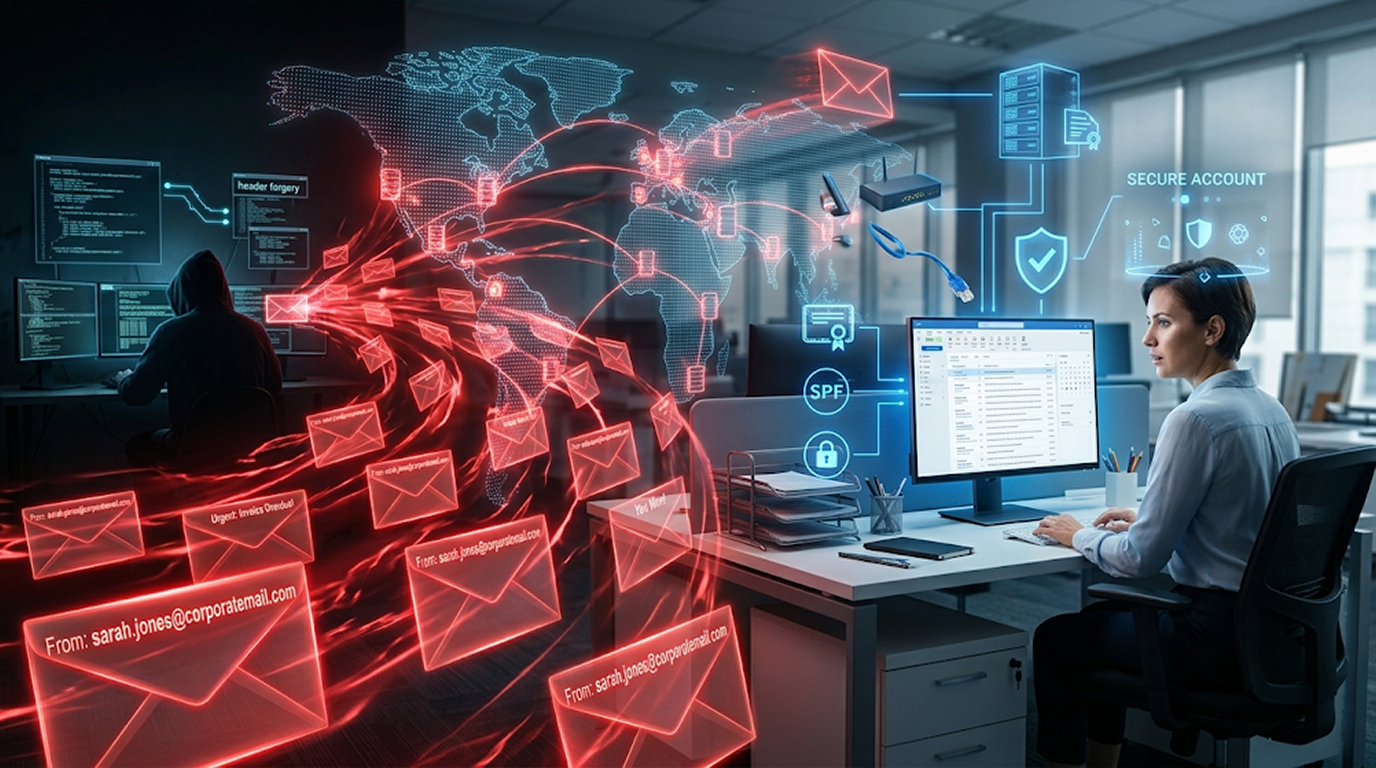
An attacker does not need to access your account in order to send you an email appearing to be from you. An attacker can enter your email address into the "From:" field of their own email client or send an email using a mail server that they own with your email address specified as the sender. An email sent this way will be accepted by the recipient mailbox server and delivered as if it was a legitimate email.
This is why you might see spam in your own inbox from your own address. The attacker is not using your account. They are just using your name.
How Hacking Is Different
Hacking is a different and more dangerous problem. When your account is hacked, the attacker has actually gained access to your account. They have your password. They can log in as you and do whatever they want.
Signs your account is actually hacked:
1. Logging in is impossible. Your password has been altered.
2. There are emails in your sent items that weren't sent by you.
3. Contacts are receiving messages from you that you didn't compose.
4. You're getting request for password resets related to other accounts that you did not request.
5. You have different types of mobile devices listed under the account activity section of your account.
6. Your recovery email address or phone number has been modified without your knowledge.
If you see these signs, you have been hacked. You need to act immediately.
What Do You Do if You Were Hacked:
1. Change all of your passwords (including for your email accounts).
2. Generate a new, very secure password that you have not previously used.
3. Set up/use two-step verification for your e-mail account
4. Sign off from all devices you accessed the e-mail account with
5. Verify if anyone else has accessed your e-mail account and made any changes to the settings
6. Contact your email provider for more help with your account.
If your account is simply being spoofed, you do not need to do any of this. Your password is safe. Your account is safe. You just need to understand how spoofing works and how to reduce the risk of it happening to you.
Why Spoofing Is So Common
Spoofing is common because it is easy, cheap, and effective.
It is easy. You do not need any technical skills to spoof an email address. There are websites and services that let you send spoofed emails with a few clicks. You do not need to hack anyone or steal any passwords.
It is cheap. Sending spoofed emails costs almost nothing. Attackers can send millions of spoofed emails for a few pounds. There is no financial barrier to entry.
It is effective. People are more likely to open an email that appears to come from someone they know. Spoofing a trusted sender increases the chance that the recipient will click a link or open an attachment.
Attackers use spoofing for phishing, spreading malware, and conducting business email compromise (BEC) scams. They are not trying to hack your account. They are trying to trick others into trusting your name.
Real Examples of Spoofing
Example 1: The CEO Scam
An attacker uses a fake email address that pretends to be that of the CEO in an attempt to send an email to the finance department and instruct them to do an urgent wire transfer to a new vendor in the company’s name. The finance employee who believes they are receiving email from their CEO does a wire transfer, thus sending money to a criminal, but the criminal did not hack the CEO account, they just used the CEO’s name to deceive the finance employee.
Example 2: Invoice Scam
A scammer impersonated a real vendor, so they could email an accounts payable department with false invoices for services the vendor actually provided; sent with an invoice that looked like it was from the vendor, it was eventually paid by an employee; with that payment gone out of funding supplied by the vendor, all funds were redirected to the scammer, even though the vendor had never been "hacked" - the scammer had simply masked their own identity to appear to be the vendor.
Example 3: Self Spoofed Scam
The scammer's phishing email appeared to come from your own account, stating that your account had been hacked and an urgency to click on a link to confirm your account ownership. You then clicked on the link and contributed your login details (username & password) to the scammer; the scammer did not hack your email account but leveraged email spoofing to capture your current password.
Do not click on any hyperlinks in any email if the source of an email to you appears to be suspicious or strange; do not assume that because an email appears to come from your email address that it actually does.
How to Tell If You Have Been Hacked or Spoofed
If someone is spoofing you:
1. You still can access your account
2. Your password still works
3. There are no unfamiliar emails in your sent messages folder
4. Your contacts are not receiving any emails from you
5. You only see unique emails from your own email address, but others have received spam-looking messages as though they were from you
If you have been hacked:
1. You cannot log into your account
2. Your password does not work
3. You have sent emails from your sent messages folder without your knowledge.
4. Your contacts tell you they received emails from you that you did not write.
5. Your account activity contains items associated with devices not familiar to you
6. Your recovery contact information has been altered.
If you are being spoofed, your account is safe. You do not need to change your password. You just need to understand what is happening.
If you are hacked, your account is compromised. You need to change your password immediately.
Why Antivirus and Password Managers Do Not Stop Spoofing
Spoofing is not a technical attack on your device or your account. It is a trick that uses your identity. It does not involve malware. It does not involve stolen passwords.
This is why antivirus software cannot stop spoofing. Antivirus protects your device from malware. It does not control how other people send emails.
This is also why changing your password does not stop spoofing. The attacker is not using your password. They are using your email address. Changing your password does not stop them from continuing to spoof your address.
The only way to stop spoofing is to use email authentication standards that help email servers verify that an email really came from the domain it claims to come from.
How to Protect Your Domain from Spoofing (For Business Owners)
If you own a domain, you can protect it from being spoofed by configuring email authentication records. These are text entries in your DNS settings that tell receiving email servers what to do with emails that claim to come from your domain.
SPF (Sender Policy Framework):
SPF allows email servers (that are receiving emails) to identify from which IP addresses are allowed to send email using your domain. If an email is sent from an IP address that is not in the list of allowed servers, it can either be rejected or be marked as SPAM.
DKIM (DomainKeys Identified Mail):
Each email you send will contain a digital signature generated from the content of the email and sent to a receiving server. The server receiving your email will be able to verify the validity of the signature against your domain's public key. It is possible for DKIM to be set up to allow an email that does not have a signature to still be delivered to the recipient's inbox.
DMARC (Domain-based Message Authentication, Reporting, and Conformance):
DMARC provides certain instructions for the server that receives an email that does not have a failed SPF check or DKIM signature. DMARC will instruct email receiving servers on what to do with mail that fails both the SPF and DKIM checks. You can configure DMARC to either "none" (just report the issue), "quarantine" (store it in SPAM) or "reject" (do not deliver it).
How to set them up:
Establishing the email authentication protocols above requires access to your own domain's DNS settings. This is typically done through either your domain registrar or hosting provider. The specific steps to gain access to DNS settings will be different depending on your provider; however, there are many online guides available on how to configure SPF, DKIM, and DMARC correctly. Many email service providers also have their own set of instructions regarding how to set up those protocols correctly.
For business owners, setting up SPF, DKIM, and DMARC has become the best way of preventing spoofing attacks. While these methods won't prevent all types of attackers from spoofing email, they will make it much more difficult for the attackers' spoofed emails to reach recipients' email inboxes.
Secure Your Personal Email against Spoofing
If you are using a personal email provider such as Google, Microsoft, or Yahoo, you cannot configure SPF, DKIM or DMARC. Email service providers will configure this for you.
Some things to consider doing:
1. Two-factor authentication (or 2FA) along with a secure password are some of the greatest ways to protect your online accounts in case they are hacked into.
2. Be mindful of the sites you share your email address on. Some websites allow their users to create accounts and then connect them to their social media accounts; therefore, the email address used to sign into those accounts would be shared with the social media platform, which creates another possible channel for attackers to find your email.
3. Use multiple email addresses to separate your personal, work, and promotional (such as websites and other services) from each other. It allows you to protect your private information by using different email accounts for different activities. You'll have an account on which you could send the necessary email in case a hacker were able to gain access to one or all of your email accounts.
4. Identify and report spam messages that seem to originate from your own account: If you see an email that seems to come from your own email account, don't engage with the email. Reporting it as spam will help your email service better filter and prevent emails of this type.
5. Don't click on links in emails from unknown sources: If an email looks like it was sent by someone you know but the sender's email address is different from the known sender's, DO NOT CLICK ON THE LINK!!!!! Phished emails can be used to trick you into giving out your username and password, as well as other confidential information!
The Bottom Line
Spoofing and hacking are not the same thing. Spoofing uses your name without your permission. Hacking breaks into your account. One is an impersonation trick. The other is a real breach.
If you see spam from your own email address, do not panic. Your account is probably safe. The attacker did not get your password. They just used your name.
If you can log into your account and nothing looks unusual, you are being spoofed, not hacked. You do not need to change your password. You just need to understand what is happening and how to reduce the risk.
By configuring SPF, DKIM, and DMARC for your business domain, you can prevent your domain from being spoofed or phished. For your personal email provider, set strong passwords and enable Two Factor Authentication; use caution when giving out your email address as well.
Knowing the difference between spoofing and hacking can relieve some of your stress if and when your name is found in a spam email message. This can help you take the right response.
FAQ Section
Is it possible for other individuals to send emails from my email address without having access to my account?
Yes. This type of attack is known as email spoofing. The attacker falsifies the “From” address on the email. The attacker does not have to have access to the account or the password; he or she just needs to know the email address associated with the account.
How can I determine if my email account has been hacked or spoofed?
If you are able to log into the account and the Sent Items folder does not have any messages that you don’t recognize, the attack against you is a spoof and not a hack. If you attempt logging into the account and cannot do so, or there are sent messages in the Sent Items folder that you do not recognize, then the attack on you was a hack.
Why do I receive spam from my own email address?
The spam being sent to you from your email address is a result of attack on your email address. This is because when someone receives an email that appears to have been sent by someone they know, they are more likely to open it. This is used by an attacker as a phishing attempt to get you to click on a link or open an attachment.
What is the best way to prevent a spoof from happening to you?
If you own your own domain name, set up SPF, DKIM, and DMARC records to help protect against spoofing. However, if you're using your own personal email service you cannot configure these types of records. Therefore, you can only do the following things to protect your account: use strong passwords; enable two-factor authentication; and be careful about who you give your email address to!
If I receive spam messages from my own email address, should I change my password?
No, changing your password will not fix the spoofing issue because the hacker is not using your password, so you should only change your password if you have proof that your email account has been hacked (such as seeing messages you did not send in your sent items folder, or if you are unable to login).