
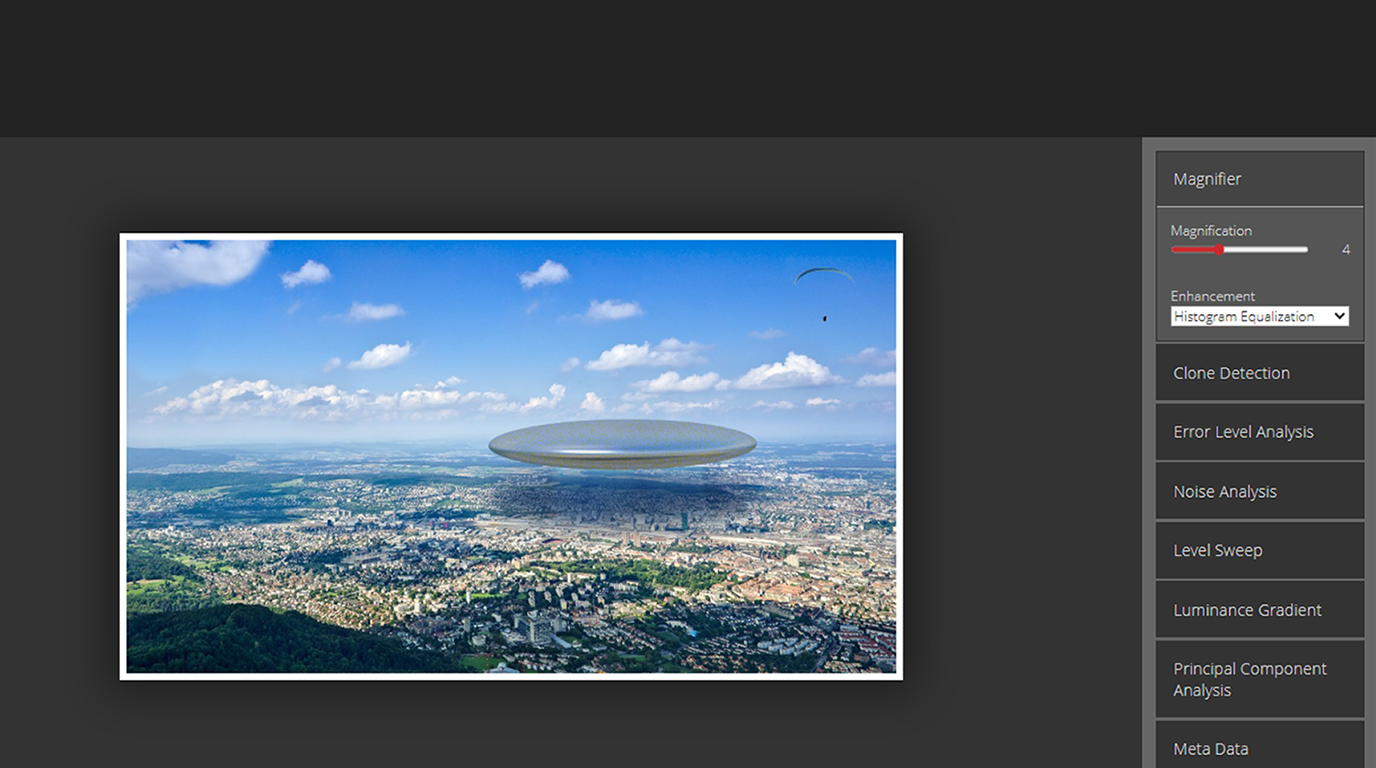
If you do any kind of OSINT, social media investigation, or scam verification work, chances are you’ve already used Forensically or you should start using it right now.
It’s completely free, browser-based, and one of the fastest tools for spotting edited, cloned, or AI-generated images. No installation, no account, no payment. Just drag and drop the image and you get useful forensic insights in seconds.
Why Forensically Is So Popular Among OSINT Investigators
1. It’s dead simple to use
2. Works entirely in your browser (no data uploaded to servers)
3. Gives you multiple forensic views in one place
4. Excellent for quick checks during pig-butchering investigations, fake profile checks, or verifying “profit screenshots”
Most Useful Features for Practical Work
Here are the checks that investigators actually use every day:
1. Clone Detection identifies duplicate sections in the image. This is often done with screenshots of fake profits and on copies or pastes from charts.
2. Error Level Analysis (ELA) will show the areas in the photo that have been changed or approved and saved using different levels of compression. The parts that have been edited will typically appear to be brighter.
3. Metadata Viewer provides Assistant with EXIF data (exchangeable image file format), a timestamp for when the photograph was taken, the device that took the shot, GPS location information, and prior editing history (when available).
4. Noise Analysis provides information about different noise patterns and can help identify images that have been created or manipulated using AI applications.
5. Level Sweep Element & Magnifier will allow you to view the levels of brightness and to move over the levels of brightness and identify possible changes.
Real Investigative Examples
Example 1: Fake Trading Profit Screenshot A Scammer Sends a Binance Dashboard Invoking +$47,832 Worth of Profit. You Upload the Image to Forensically, and Clone Detection Triggers Immediately with Identical Chart Sections and Repeated Balances. The ELA Proves the Profit Text was Added Later; therefore, it was Fake.
Example 2: A Scammer has a Fake Profile Picture and Aclaims to be "Lara from Dubai" While Shopping at 'Record High'y's. By Using Forensically's "Clone Detection" tool, You Can Identify a Lot of Cloning on the Background of Her Face and Background Behind Her Face (Many Users Will Use AI Face Swapping). Upon Using Metadata to Assess the Original Photo, It was Previously Saved Using Photoshop 30 Minutes Before Being Uploaded Into a Different Location; Therefore, This Profile Picture is Likely a Creation of AI Or Edited Heavily.
Example 3: A Scammer Sends a Fake Bank Transfer Receipt. Noise Analysis Reveals an Unnatural Uniformity in the Text Area. The Clone Detection Identifies Multiple Copies of What Is Likely the Same Transaction ID; Therefore, This Document Was Forged by the Scammer.
Quick Exercise You Can Try Right Now
1. Visit https://29a.ch/photo-forensics
2. Look for any screenshots of profits taken by crypto groups' on Telegram, or any suspicious-looking Instagram DMs.
3. Drag-and-drop the image onto Forensically.
4. Run these checks in order:
a) Clone Detection
b) Error Level Analysis
c) Metadata
d) Noise Analysis
5. Ask yourself: Does anything look unnatural? Are there cloned areas? Does the ELA show bright spots on text or numbers?
Do this exercise with 3 different “proof” images today. You’ll quickly develop an eye for fake screenshots.
Pro Tips from Investigators
1. First, zoom in to 100% on the image to examine it closely, most low-quality fakes can look much better when viewed as smaller than actual size.
2. Check multiple copies of the same person or item to detect multiple copies of the same elements.
3. If there is no metadata left on a picture, it can be very suspicious because most pictures of people taken with cell phones have EXIF data.
4. Combine Forensically with Google Reverse Image Search and TinEye for best results.
Forensically won’t catch every sophisticated fake, but for 80–90% of the scam images you’ll encounter in pig-butchering, romance scams, or fake investment schemes, it gives you very strong signals in under 30 seconds.
Bookmark it. Use it. It’s one of the most practical free tools in any OSINT investigator’s kit.


