
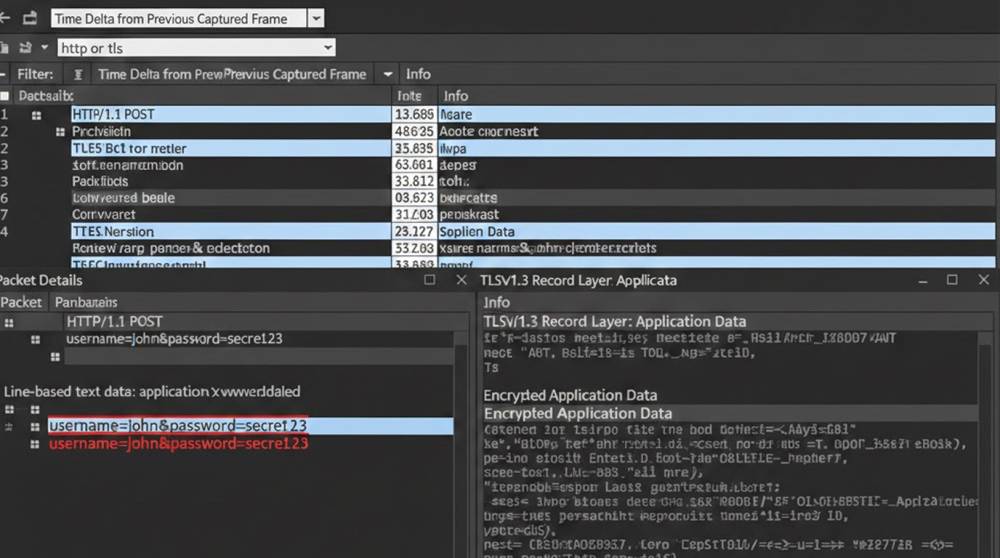
When you capture network traffic with Wireshark, the difference between plaintext (HTTP) and encrypted (HTTPS/TLS) becomes very obvious and very useful for finding leaks. Plaintext shows everything in clear view: usernames, passwords, session tokens, API keys, personal data. Encrypted traffic hides the actual content behind TLS, so you can only see metadata (host, path, method, headers). If sensitive information appears in plaintext, that’s a serious risk , anyone on the same network (or in the middle) can read it.
Below are detailed, realistic examples of what captured traffic looks like for both cases, with exact Wireshark views and what you would see in practice:
1. HTTP POST Method With Login Credentials Exposed
Scenario A web application utilizes HTTP for login credentials via a POST request, which is not an acceptable security practice to use, but common in legacy internal applications or misconfigured APIs).
Capture of HTTP POST Request Using Wireshark
1. Packet Summary: POST /LOGIN /HTTP/1.1 \
2. HTTP Display Filter Used: http.request.method="POST" \
To fully view the complete HTTP request, navigate to HTTP Stream .
POST /LOGIN /HTTP/1.1
Host: vulnerable-app.local
User-Agent: Mozilla/5.0 (Windows NT 10.0; Win64; x64)…
Content-Type: application/x-www-form-urlencoded
Content-Length: 38
username=john.doe&password=Secret123!&remember_me=on
The HTTP response is located in the HTTP response fragment below (for successful request): HTTP/1.1 HTTP/1.1 302 Found
Location: /dashboard
Set-Cookie: session=eyJhbGciOiJIUzI1NiIsInR5cCI6IkpXVCJ9...
What are the details in plain text we found:
1. Username and Password in clear text inside of the POST Body.
2. Session cookie in response headers.
3. Anyone sniffing the network (public Wi-Fi, rogue AP) sees the full credentials.
Exercise
1. Set up DVWA locally (low security mode).
2. Start Wireshark capture → go to login page → submit credentials.
3. Stop capture → filter: http.request.uri contains "/login"
4. Follow HTTP stream → see your username/password in plaintext.
2. Encrypted HTTPS POST – No Leak (Expected Behavior)
Scenario Same login form, but correctly using HTTPS (TLS 1.3).
Captured HTTPS traffic in Wireshark
1. First Packets: TLS Handshake (Client Hello to Server Hello to Certificate to Key Exchange)
2. After the Handshake: Application Data (protected)
Filter: tls.handshake or tls.application_data
Typical Packet Info (Application Data):
TCP, Source Port: 443, Destination port: 49732
Transport Layer Security
TLSv1.3 Record Layer: Application Data
Content Type: Application Data (23)
Version: TLS 1.2 (0x0303)
Length: 1234
Application Data: (encrypted blob – cannot read)
If you then Follow the TLS Stream (no decrypt keys): you only see gibberish, no username, password, or token.
Exercise
1. Start capturing traffic to https://example.com/login (or any other real HTTPS site).
2. Filter your capture for tls.handshake.type == 1 (client hello) to see negotiated ciphers.
3. Compare this capture to the HTTP capture performed in the previous activity to see how plaintext and encrypted differ.
3. Mixed Traffic Leak - HTTPS Login with Plaintext API Call
The App uses HTTPS for login, but has an internal API call leaking session tokens or API keys over HTTP.
Captured mixed example
1. HTTPS Login (encrypted & safe) = POST /auth → 200 OK with session cookie.
2. Subsequent HTTP call (leaking):
GET /api/user/profile?token=eyJhbGciOiJIUzI1NiIsInR5cCI6IkpXVCJ9... HTTP/1.1
Host: api.vulnerable-app.local
What’s leaking
1. JWT/session token shown in plain text within the query string.
2. Any person on the network can capture the JWT/session token and impersonate the user.
Exercise
1. Use a testing app, or a browser add-on that forces HTTP on specified endpoints.
2. Capture traffic, then filter (http.request.uri contains "token").
3. Search for any sensitive tokens contained in GET parameters via HTTP.
4. Bonus: Discovering Poor Encryption (TLS 1.0/1.1 or Lack of Forward Secrecy).
Findings: Weak Handshake
1. Client Hello has either TLS 1.0 or 1.1 (both obsolete).
2. Cipher Suite does not have forward secrecy (i.e., RSA, not ECDHE).
Exercise
1. Use sslabs.com/test to connect to an old or testing site.
2. Capture the #tls handshake and filter the capture by using 'tls.handshake.type' equaling one.
3. Review the cipher suites and protocol versions for any weak ciphers for downgrade attack vulnerability (TLS 1.0 or 1.1).
Takeaways & Safety Notes
1. A plain text connection will expose the entire request or response body.
2. An encrypted connection will encrypt all request and response content but will continue to expose the header information (path, host, cookies).
3. Recommended Filters in Wireshark
a. http.request.method == "POST"
b. http contains "password"
c. tls.handshake.type == 1 (client hello)
4. Always test on local labs (DVWA, Juice Shop, Mutillidae) and never on a live website or on production traffic without permission.
Seeing these leaks in Wireshark makes the risk very concrete. Try the exercises, you’ll quickly understand why “HTTPS everywhere” is non-negotiable.


