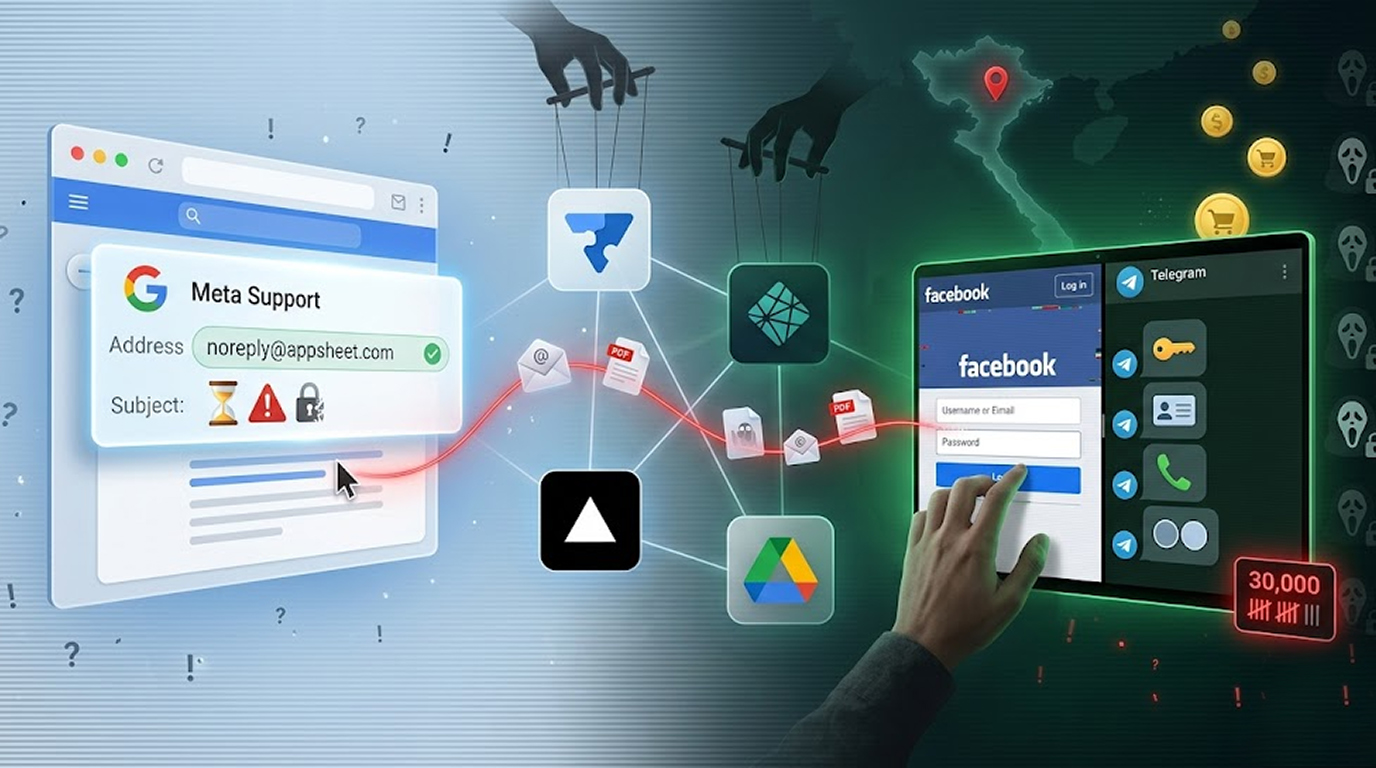
Google AppSheet phishing relay campaign
You receive a fake email from Meta Support that looks legitimate, as it was sent from a Gmail address using the @appsheet.com domain (which is operated by Google).
Your email provider does not flag it as spam; when you click on the email, the phishing scam begins as an entirely Vietnamese operation, which has compromised an estimated 30,000 Facebook accounts through the operation named AccountDumpling by security researchers at Guardio.
By using AppSheet, attackers can use Google’s platform to create these phishing emails without having to launch their own mail servers or utilize third-party infrastructure, they simply abuse Google’s services.
Why do attackers use Google AppSheet?
Google AppSheet is an actual no-code platform that can be used to develop business applications and within those applications an attacker can create forms, automate workflows, and send notifications from [email protected])
The Google AppSheet phishing relay campaign exploits this trust. Victims receive emails from a genuine Google domain. Traditional email security tools see @appsheet.com and assume it is safe. The attackers weaponize that assumption.
Guardio security researcher Shaked Chen explained: "What we found wasn't a single phishing kit. It was a living operation with real-time operator panels, advanced evasion, continuous evolution and a criminal-commercial loop that quietly feeds on the same accounts it helps steal back."
The Google AppSheet phishing relay campaign targets Facebook Business account owners specifically. These accounts have value beyond personal profiles, they control ad budgets, business pages, and customer data.
The Phishing Lures
The Google AppSheet phishing relay campaign uses multiple psychological triggers to manipulate victims. All of them create a sense of urgency and fear.
1. Meta Support appeals. The most common email claims to be from Meta Support, urging the recipient to submit an appeal or risk permanent account deletion. Business owners panic. They click.
2. Copyright complaints. Some emails claim a copyright violation has been filed against the recipient's content. The victim must verify their identity immediately or face legal consequences.
3. Verification reviews. The Google AppSheet phishing relay campaign also impersonates Meta's verification team, asking business accounts to complete a "security check" to maintain their verified status.
4. Corporate Recruitment. Fake profiles and job openings that claim to be from WhatsApp, Meta, Adobe, Pinterest, Apple, and Coca-Cola are created by scammers in order to establish trust with the victim before leading that victim to a fraudulent site.
5. Facebook login alerts. False notifications about unrecognized logins prompt users to "secure" their accounts by entering credentials on a fake page.
The Four Attack Clusters
Guardio identified four main clusters within the Google AppSheet phishing relay campaign. Each uses different infrastructure but feeds into the same criminal ecosystem.
Cluster 1: Netlify-hosted help centers. Fake help centre pages with Facebook branding and hosting by Netlify are set up by cybercriminals to steal Facebook accounts by obtaining usernames as well as passwords (username and password), date of birth, phone number and photos of each person's identification card issued by the government. Stolen data is sent to Telegram accounts operated by the criminals to retrieve on them.
Cluster 2: Blue badge evaluation. This cluster uses Vercel-hosted pages with "Security Check" or "Meta | Privacy Center" branding. Before reaching the phishing page, victims must pass a fake CAPTCHA check. Once inside, the Google AppSheet phishing relay campaign collects contact information, business details, credentials (with a forced retry mechanism), and 2FA codes. Everything exfiltrates to Telegram.
Cluster 3: Google Drive PDFs. The attackers create the PDF files with Canva. The PDFs claim to be instructions on how to verify an account. Users are connected to other websites that collect users’ passwords, authentication codes provided through app stores, images of IDs (e.g. driver’s licenses), and screenshots of the web browsers using html2canvas tech.
Cluster 4: Fake job offers. This cluster does not immediately ask for credentials. Instead, it builds trust. The Google AppSheet phishing relay campaign impersonates legitimate companies and invites victims to join calls or continue discussions on attacker-controlled sites.
Who Is Behind the Operation?
The Google AppSheet phishing relay campaign has strong links to Vietnam.
Guardio found smoking gun evidence inside the PDFs from Cluster 3. The PDF metadata listed a Vietnamese name as the author: PHẠM TÀI TÂN.
Researchers conducted an additional open-source investigation and located a website called phamtaitan[.]vn. This website lists the same name and says they work in the field of Digital Marketing, offer Digital Marketing resources, and consult on how to use different Digital Marketing strategies effectively.
A February 2023 post on X from the website's handle reinforces the connection. The Google AppSheet phishing relay campaign operators appear to be Vietnamese digital marketers who discovered that stealing and selling Facebook accounts is more profitable than legitimate marketing.
The Scale: 30,000 Stolen Accounts
The Google AppSheet phishing relay campaign has been remarkably successful. Telegram channels associated with the first three clusters contain approximately 30,000 victim records.
Victims are located primarily in:
• United States
• Italy
• Canada
• Philippines
• India
• Spain
• Australia
• United Kingdom
• Brazil
• Mexico
Most victims have been locked out of their own Facebook accounts. The Google AppSheet phishing relay campaign operators change passwords, add their own recovery information, and take full control.
What Happens to Stolen Accounts?
The Google AppSheet phishing relay campaign is not just about credential theft. It is a full-fledged criminal business.
Stolen Facebook accounts are sold through an illicit storefront run by the threat actors.
The value of an account depends on several factors:
1. Business verification. Verified business accounts command higher prices.
2. Ad spend history. Accounts with established ad budgets are valuable for running scam campaigns.
3. Page followers. Large pages with engaged audiences are sold as ready-made marketing channels.
4. Recovery options. Accounts where the attackers have replaced recovery email and phone numbers are worth more.
The Google AppSheet phishing relay campaign creates a closed loop: steal accounts, strip them of value, sell them back to the market, often to other cybercriminals who will use them for additional fraud.
How the Attackers Evade Detection
The Google AppSheet phishing relay campaign uses multiple evasion techniques that make it difficult to stop.
1. Legitimate infrastructure. By abusing Google AppSheet, Netlify, Vercel, Google Drive, and Canva, the attackers ensure their emails and pages are not immediately flagged as malicious. These are trusted domains.
2. CAPTCHA gating. Cluster 2 uses a fake CAPTCHA page before redirecting to the phishing landing page. This serves two purposes: it filters out automated security scanners and makes victims feel they are completing a legitimate security check.
3. Forced retry on credentials. The Google AppSheet phishing relay campaign pages sometimes reject initially entered passwords, forcing victims to re-enter them. This ensures the attackers capture the correct password even if the victim mistypes.
4. 2FA harvesting. Many phishing kits cannot capture one-time codes. The Google AppSheet phishing relay campaign pages explicitly ask for 2FA codes during the "verification" process.
5. Telegram exfiltration. Stolen data is sent to Telegram channels in real time. Attackers can see incoming victim data instantly and begin account takeover within minutes.
How to Protect Your Facebook Business Account
The Google AppSheet phishing relay campaign is active right now. Here is how to stay safe.
1. Never trust emails from @appsheet.com unless you explicitly requested them. The Google AppSheet phishing relay campaign relies on this trust. If you receive an unexpected email from AppSheet, treat it as suspicious even if it appears to come from Meta.
2. Check the actual sender address. Phishing emails can display a fake display name while the underlying address reveals the truth. Look at the full email headers.
3. Avoid clicking on links in money-related alerts if you receive one. The Google AppSheet phishing relay campaign plays on people’s fears. Legitimate security alerts sent via email from Meta will always tell you to go to facebook.com to log in instead of clicking on a link.
4. Use a two-factor authentication with an application, rather than text (SMS) messages, to confirm your identity. Text message (SMS) two-factor authentication can be taken advantage of, while Google Authenticator, Microsoft Authenticator, or a physical key will be more secure. One time codes can be intercepted as a result of the Google AppSheet phishing relay scheme, however, it would be extremely difficult to intercept a physical key.
5. Monitor your Facebook Business account for unauthorized changes. Check for new admins, unfamiliar devices, and changed recovery options. The Google AppSheet phishing relay campaign operators often add their own accounts as admins.
What Meta and Google Are Doing
Meta has been notified of the Google AppSheet phishing relay campaign. The company typically removes reported phishing pages and compromised accounts.
Google has also been informed about AppSheet abuse. The Google AppSheet phishing relay campaign violates the platform's terms of service. The issue of whether AppSheet sends authentic notifications or not results in Google being unable to just stop all email messages from the AppSheet domain.
Ultimately the user should take the responsibility to identify phishing attempts by AppSheet.
Final Thoughts
The Google AppSheet phishing campaign is not a complex campaign from a nation state.
It is a criminal enterprise run by Vietnamese actors who discovered an efficient way to monetize stolen Facebook accounts.
What makes the Google AppSheet phishing relay campaign notable is its use of trusted platforms as attack infrastructure. AppSheet, Netlify, Vercel, Google Drive, and Canva are all legitimate services. The attackers have simply repurposed them.
As Chen noted: "Another entry in the pattern we keep surfacing: trusted platforms repurposed as delivery, hosting, and monetization layers."
The Google AppSheet phishing relay campaign will continue until the platforms change their policies or users stop clicking. Do not be the next victim. Delete the email. Log in directly. And check your Facebook Business account permissions today.
FAQ Section
Q1: What's the best way to tell if I've been a victim of the phishing relay that Google AppSheet is using?
Check your email inbox for any communication coming from [email protected]. If there are any messages that sound harmful (like an email telling you your account has been deleted), then your account has most likely been compromised (unless you've recently created an account).
If you have clicked on ANY of those email links and entered your login information for that link (i.e., username and password), your account is probably compromised as well.
Q2: Are personal Facebook accounts affected only or business accounts too?
The Google AppSheet phishing relay campaign targets Facebook Business Account Owners because these accounts can be resold at a higher value however, if a Facebook user falls for the phishing messasge and enters their credentials they can lose their personal Facebook account as well.
Q3: What should I do if I have entered my Facebook credentials into a phishing site?
Change your password immediately to your Facebook account. You will need to revoke all active sessions in your account by going into the Settings - Security & Login section of your Facebook account. You will also need to reset your Two Factor Authentication codes. Check to see if there are any additional admins listed on any of your Business Pages. The operators of the Google AppSheet phishing relay campaign act quickly following the theft of your Facebook credentials.
Q4: Does Two Factor Authentication Protect You from the Phishing Relay Campaign?
Two Factor Authentication is not 100% protection from phishing attacks when the phishers are soliciting you to give them the code as part of the verification process in an attempt to steal your credentials. If you submit your username, password and one-time code, there is nothing stopping a phishing attacker from using all three immediately to access your account. Additionally, U2F Hardware Security Keys offer higher resistance to phishing relay campaigns because they validate the domain of the site that is trying to authenticate with you.
Q5: Is the Google AppSheet phishing relay campaign still operating?
Yes. Guardio noted this as an active operation with real-time panels for operators to view results and ongoing changes. The Google AppSheet phishing relay is consistently changing its deceiving email message schemes to lure unsuspecting users. Therefore, any unsolicited email claiming to represent Meta Support should be considered part of this phishing relay.