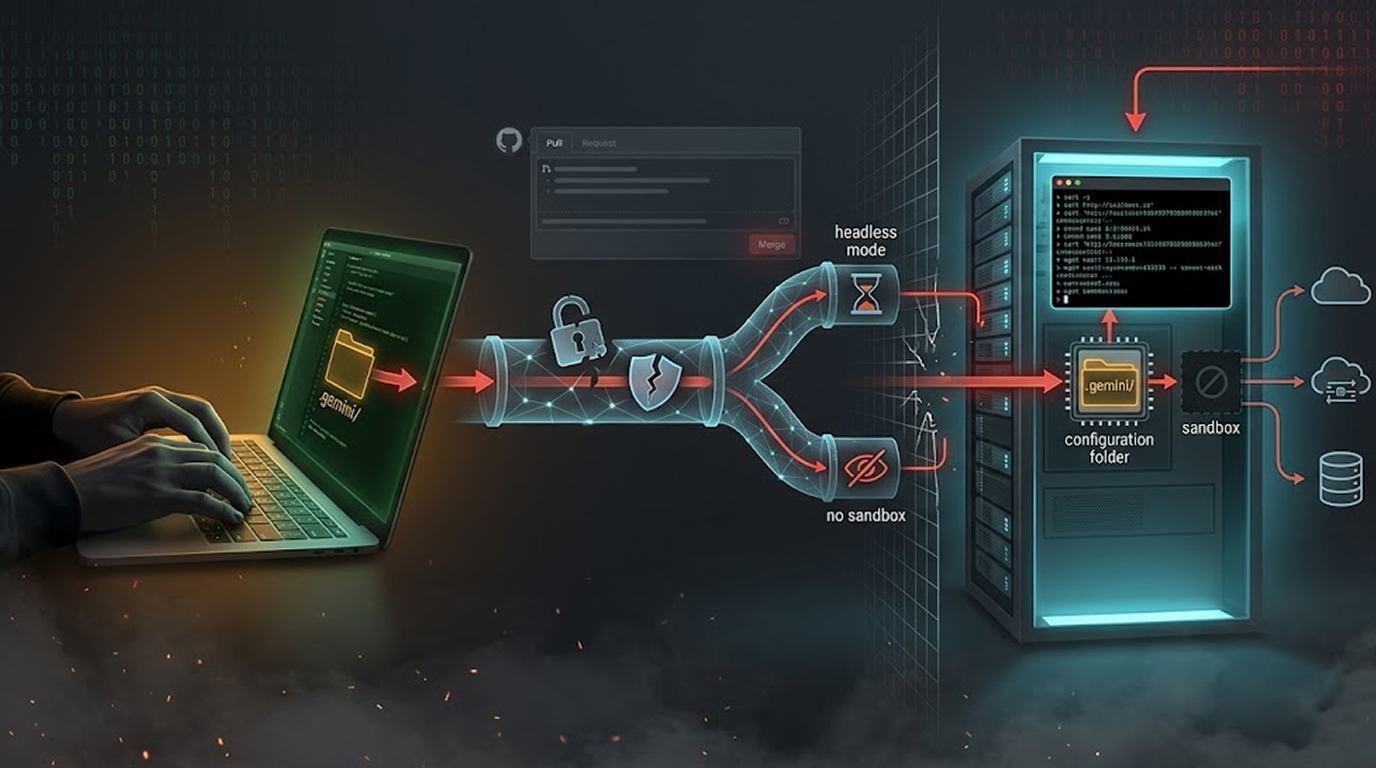
A perfect 10. That is the CVSS score Google assigned to a security flaw in its Gemini CLI tool. And for good reason.
The Gemini CLI remote code execution vulnerability could have allowed unprivileged external attackers to execute arbitrary commands on host systems. No authentication. No user interaction. No sandbox escape needed, because the sandbox never even initialized.
The flaw affected both the @google/gemini-cli npm package and the google-github-actions/run-gemini-cli GitHub Actions workflow. Google patched the issue in versions 0.39.1, 0.40.0-preview.3, and 0.1.22 respectively.
But there were some difficult issues surrounding how AI agents would deal with untrusted input within CI/CD pipelines due to the Gemini CLI remote code execution vulnerability.
What was the vulnerability?
The vulnerability in the Gemini CLI for remote code execution was based on one very dangerous fact: folder trust is established automatically by the system.
Before this vulnerability was discovered, when the Gemini CLI was running in 'headless' mode (the mode used in a CI/CD environment) it would automatically trust the current workspace folder. As such, when the Eclipse IDE loaded up, it would automatically load any agent configuration files that were found in the .gemini directory without any validation, sandboxing or explicit user approval.
This is important because if you had a CI/CD pipeline set up to validate PRs from non-registered contributors, if a malicious contributor submits a PR and included a carefully crafted .gemini configuration file, the '.gemini' configuration file will be run on your CI/CD pipeline without you even knowing it has been submitted.
When the Gemini CLI remote code execution vulnerability is triggered, the workflow automatically loads that malicious configuration. The configuration then executes arbitrary commands on the host system.
No prompt. No warning. No sandbox.
Novee Security, which discovered the flaw, explained it succinctly: "The vulnerability allowed an unprivileged external attacker to force their own malicious content to load as Gemini configuration. This triggered command execution directly on the host system, bypassing security before the agent's sandbox even initialized."
The CVSS 10 score explained
The Gemini CLI remote code execution vulnerability has received a score of 10.0 on the CVSS, an indication of the most severe score that may be assigned.
CVSS 10 indicates:
1. There is a possibility that the attacker will be able to launch an attack on the victim without needing to have local access.
2. The Attack is Simple to Execute, No Special Conditions Are Required to Execute an Attack.
3. Attack is Successful Without a User's Interaction. The Attack Will Occur Automatically, Regardless of User Associated With the Attack.
4. Attacker Can Compromise All Aspects of a System Including the Confidentiality, Integrity, and Availability of Data.
In short, the Gemini CLI remote code execution vulnerability gave attackers everything they needed and asked for nothing in return.
Affected Versions and Components
The Gemini CLI remote code execution vulnerability affected three distinct components:
1. If Developers are using Headless Mode with Untrusted Folders and they are using the npm package @google/gemini-cli before version 0.39.1, this presents a security issue for Developers working locally or in scripts.
2. If Developers are using the npm package @google/gemini-cli and the preview branch version is before version 0.40.0-preview.3, this means they also have the same security issue as above.
3. CI/CD Pipelines that are using the GitHub Actions Workflow google-github-actions/run-gemini-cli version prior to v0.1.22 are also at risk of being exploited due to the fact that they process untrusted data via Pull Request.
If you used any of these components in headless mode on untrusted folders, the Gemini CLI remote code execution vulnerability exposed your systems to attack.
How Google Fixed It
Google's patch addresses the Gemini CLI remote code execution vulnerability by removing automatic folder trust.
Now, Gemini CLI requires folders to be explicitly trusted before loading configuration files.
Users have two options:
For trusted inputs. If your workflow runs on trusted inputs (for example, reviewing pull requests only from trusted collaborators), you can set GEMINI_TRUST_WORKSPACE: 'true' in your workflow. This restores the previous behavior safely because the input source is trusted.
For untrusted inputs. If your workflow processes untrusted inputs (like public pull requests), you must follow Google's hardening guidance for the run-gemini-cli action. Do not set GEMINI_TRUST_WORKSPACE to true.
Google also hardened tool allowlisting when Gemini CLI runs in --yolo mode (auto-approve). Previously,
the Gemini CLI remote code execution vulnerability could be exploited through prompt injection because --yolo mode ignored allowlists and ran all tool calls automatically, including run_shell_command.
In version 0.39.1, the policy engine now evaluates tool allowlisting even under --yolo mode. Some workflows that previously depended on unrestricted auto-approval may now fail silently unless tool allowlists are explicitly configured.
Bigger Picture: Security Vulnerabilities in Cursor
The issue of remote code execution vulnerability within the Gemini Command Line has not just been a random occurrence; indeed, AI-based development tools are now being investigated by cyber security professionals.
Novee Security published findings of a high risk vulnerability in the Cursor AI-based integrated development environment (IDE), listed as CVE-2026-26268 (CVSS 8.1), allowing for a user to escape a sandboxed environment via using .git files to create a malicious hook where development tools can run against bare repositories.
An example of this attack is detailed below.
1. User clones a public repository from GitHub that is a bare repository using a malicious post-checkout git hook.
2. User opens the cloned bare repository with Cursor IDE.
3. User provides an innocent request to explain the repository.
4. Cursor’s AI agent parses the AGENTS.md file to determine where to find the bare repository and run git checkout.
5. Cursor’s AI agent runs the malicious post-checkout git hook, executing arbitrary code will execute on the victim's machine. The Gemini CLI remote code execution vulnerability and the Cursor Git hook attack share a common theme: AI agents trust repository contents that no human would trust.
Researcher Assaf Levkovich explained the Cursor flaw: "When the agent runs git checkout as part of fulfilling a routine request, it is not doing anything the user didn't implicitly authorize. But neither the user nor the agent has visibility into what the repository's Cursor Rules have set in motion.
A malicious pre-commit hook embedded in a nested bare repository executes silently, outside the agent's reasoning chain and outside the user's field of view."
CursorJacking: Another Unpatched Flaw
Separately, researcher Roy Paz at LayerX discovered CursorJacking (CVSS 8.2), an access control vulnerability in Cursor that allows installed extensions to access sensitive API keys and credentials stored in a local SQLite database.
The Gemini CLI remote code execution vulnerability required no extension installation. CursorJacking requires a malicious extension. However, both demonstrate that AI development tools are expanding the attack surface faster than security controls are evolving.
Cursor maintains that extension access is limited to the local machine where the user has already installed and granted permissions. The company advises users to stick to trusted extensions.
How to Protect Your CI/CD Pipelines
The Gemini CLI remote code execution vulnerability is patched, but the lessons apply broadly.
1. Audit your workflows. If you use google-github-actions/run-gemini-cli, confirm you are running version 0.1.22 or later. Check your package.json for @google/gemini-cli and update to 0.39.1 or higher.
2. Review folder trust settings. The Gemini CLI remote code execution vulnerability existed because automatic trust was the default. Do not enable GEMINI_TRUST_WORKSPACE unless you absolutely trust every input your workflow processes.
3. Apply least privilege. Run CI workflows with minimal permissions. The Gemini CLI remote code execution vulnerability could execute arbitrary commands; limiting what those commands can do reduces impact.
4. Treat pull requests as untrusted. This should be default behavior. The Gemini CLI remote code execution vulnerability exploited the opposite assumption. Review every workflow that processes external contributions.
5. Update Cursor. If you use Cursor IDE, update to version 2.5 or later to patch CVE-2026-26268. For CursorJacking, no patch exists yet—limit extension installations to trusted sources.
Final Thoughts
The Gemini CLI remote code execution vulnerability earned a CVSS 10 for a reason. It was trivially exploitable, required no privileges, and gave attackers full system access. The only saving grace? Responsible disclosure and a fast patch.
But the deeper issue remains. AI agents are being integrated into CI/CD pipelines, development environments, and production systems. They are given permissions. They are told to execute commands. And they are trusting files and folders that come from untrusted sources.
The Gemini CLI remote code execution vulnerability is patched.
FAQ Section
Q1. What is the CVSS vulnerability for Gemini CLI remote code execution?
This vulnerability has a CVSS rating of 10.0—the most severe possible rating. This indicates a network attack vector, low complexity, no privileges required, no user interaction, and full impact to all three areas of confidentially, integrity, and availability.
Q2. Do Gemini CLI remote code execution vulnerabilities exist in non-headless environments?
No, only Gemini CLI running in headless environments (CI environment) is vulnerable. Interactive Gemini CLI running with a graphical interface is not affected; the reasons for this include that folder trust requires user confirmation.
Q3. How do I determine whether or not my GitHub Actions workflows are vulnerable?
You can review your workflow files for uses: google-github-actions/run-gemini-cli. If the version is below 0.1.22, your workflow is vulnerable; you need to upgrade your workflow to at least 0.1.22. Also, check whether GEMINI_TRUST_WORKSPACE: 'true' in untrusted inputs exists because that will cause the same vulnerable behavior.
Q4. Is there a connection between Cursor's Git hook vulnerability (CVE-2026-26268) and the flaw identified in the Gemini CLI software?
Yes, both vulnerabilities arise from the use of AI agents that accept untrusted data from repositories. The vulnerability in Gemini CLI is an RCE (Remote Code Execution) that takes advantage of automatic trusting of folder-based configuration files.
The vulnerability in Cursor is located in the use of Git hooks in bare repositories. There are similarities in that both (Cursor and Gemini) vulnerabilities exist because of a lack of proper sandboxing for the AI being able to operate on untrusted input.
Q5. Can a person exploit the Gemini CLI RCE through a public GitHub pull request (PR)?
Yes, a malicious attacker could exploit the Gemini CLI RCE in this way and that is how the vulnerability is designed to be used. By submitting a PR that contains a specially crafted .gemini/config file, the attacker would cause the CI/CD (Continuous Integration/Continuous Deployment) process to execute the command encapsulated in the malicious file, without having to have any special access or permission to do so.