
An anonymous security researcher who previously disclosed three Microsoft Defender zero-days is back with two more, and these new flaws affect BitLocker and the Windows Collaborative Translation Framework (CTFMON).
The BitLocker bypass privilege escalation zero day vulnerabilities have been codenamed YellowKey and GreenPlasma by the researcher who goes by the online aliases Chaotic Eclipse and Nightmare-Eclipse, and the researcher described YellowKey as one of the most insane discoveries they ever found.
YellowKey is a BitLocker bypass that functions like a backdoor, and the bug exists only in the Windows Recovery Environment (WinRE), which is a built-in framework designed to troubleshoot and repair unbootable operating systems.
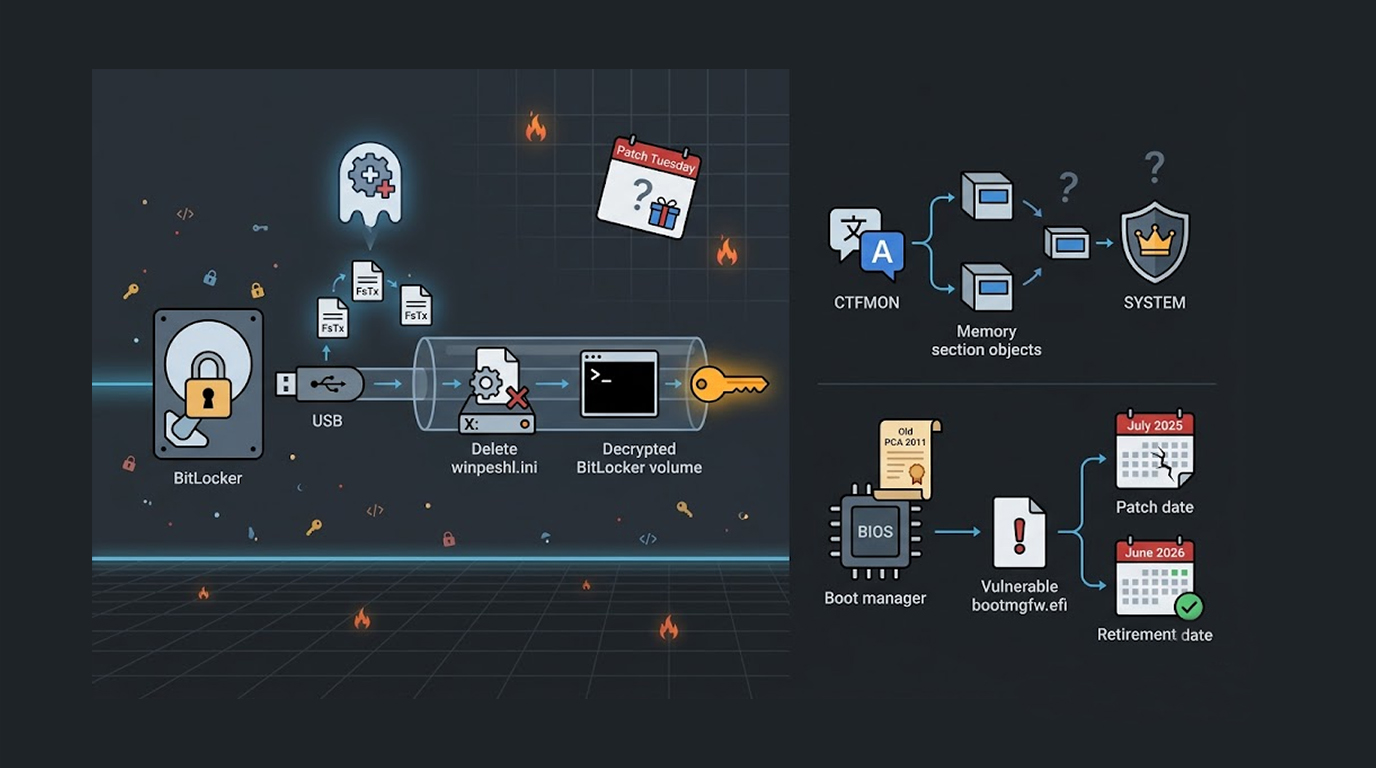
GreenPlasma is a privilege escalation vulnerability in Windows CTFMON, and it allows an unprivileged user to create arbitrary memory section objects within directory objects writable by SYSTEM, potentially enabling manipulation of privileged services or drivers.
YellowKey: The BitLocker Backdoor
The BitLocker bypass privilege escalation zero day known as YellowKey affects Windows 11 and Windows Server 2022 and 2025, and the attack involves copying specially crafted FsTx files onto a USB drive or the EFI partition.
An attacker with physical access to a target Windows computer with BitLocker protections enabled can plug the USB drive into the machine, reboot into Windows Recovery Environment, and trigger a shell by holding down the CTRL key.
The BitLocker bypass privilege escalation zero day works because the Transactional NTFS bits on the USB drive can delete the winpeshl.ini file on another drive (the X: drive in WinRE), and this gives the attacker a command prompt with BitLocker already unlocked instead of the expected Windows Recovery environment.
Security researcher Will Dormann reproduced YellowKey with a USB drive attached, and he noted that while the TPM-only BitLocker bypass is indeed interesting, the buried lede is that a System Volume Information\FsTx directory on one volume can modify the contents of another volume when it is replayed, and this by itself sounds like a vulnerability.
The researcher emphasized that TPM plus PIN does not help, the BitLocker bypass privilege escalation zero day is still exploitable regardless, and they also said they think it will take a while even for Microsoft Security Response Center (MSRC) to find the real root cause of the issue because the vulnerability is so well hidden.
GreenPlasma: CTFMON Privilege Escalation
The second BitLocker bypass privilege escalation zero day vulnerability is actually a separate privilege escalation flaw called GreenPlasma, and it affects the Windows Collaborative Translation Framework (CTFMON).
GreenPlasma allows an attacker to obtain a shell with SYSTEM permissions, and the vulnerability arises from what has been described as Windows CTFMON arbitrary section creation.
The released proof-of-concept is incomplete and lacks the necessary code to obtain a full SYSTEM shell, but in its current form the BitLocker bypass privilege escalation zero day exploit can allow an unprivileged user to create arbitrary memory section objects within directory objects writable by SYSTEM.
A standard user does not have write access to these locations normally, but GreenPlasma bypasses this restriction, and an attacker could potentially manipulate privileged services or drivers that implicitly trust those paths.
The Researcher's History with Microsoft
The BitLocker bypass privilege escalation zero day disclosures come nearly a month after the same researcher published three Microsoft Defender zero-days named BlueHammer, RedSun, and UnDefend, and those disclosures happened after the researcher expressed dissatisfaction with Microsoft's handling of the vulnerability disclosure process.
BlueHammer was officially assigned CVE-2026-33825 and patched by Microsoft last month, but the researcher said Microsoft appears to have silently addressed RedSun without issuing any advisory.
The BitLocker bypass privilege escalation zero day researcher also promised a big surprise for Microsoft coinciding with the next Patch Tuesday release in June 2026.
Microsoft responded to The Hacker News saying it has a customer commitment to investigate reported security issues and update impacted devices to protect customers as soon as possible, and that coordinated vulnerability disclosure helps ensure issues are carefully investigated and addressed before public disclosure.
BitLocker Downgrade Attack
Separately, French cybersecurity company Intrinsec detailed another attack chain against BitLocker that leverages a boot manager downgrade, and this attack exploits CVE-2025-48804 with a CVSS score of 6.8 to bypass encryption on fully patched Windows 11 systems in under five minutes.
The attack works because the boot manager loads the System Deployment Image (SDI) file and the WIM referenced by it, and it verifies the integrity of the legitimate WIM, but when a second WIM is added to the SDI with a modified blob table, the boot manager checks the first legitimate WIM while simultaneously booting from the second attacker-controlled WIM.
This second WIM contains a WinRE image infected with cmd.exe, which executes with the decrypted BitLocker volume.
Microsoft released fixes for this security defect in July 2025, but security researcher Cassius Garat said the problem lies in the fact that Secure Boot only verifies a binary's signing certificate, not its version, so a vulnerable version of bootmgfw.efi that does not contain the patch and is signed with the trusted PCA 2011 certificate can be used to bypass BitLocker safeguards.
The PCA 2011 Certificate Problem
Microsoft plans to retire the old PCA 2011 certificates next month in June 2026, and as long as the certificate is not revoked, even an old vulnerable boot manager can be loaded without triggering an alert.
An attacker needs physical access to the target machine to pull off the downgrade attack, but for many organizations this is a realistic threat model, especially for laptops, executive devices, and remote workers.
To counter the risk, organizations should enable a BitLocker PIN at startup for preboot authentication, migrate the boot manager to the CA 2023 certificate, and revoke the old PCA 2011 certificate.
The Physical Access Question
Both YellowKey and the boot manager downgrade attack require physical access to the target machine, and this significantly reduces the risk for cloud servers and remote systems that are never physically accessible to attackers.
However for laptops, especially those carried by executives, salespeople, and remote employees, the BitLocker bypass privilege escalation zero day vulnerabilities are a serious concern, a lost or stolen laptop with BitLocker enabled should be protected, but these flaws show that protection is not absolute.
An attacker who steals a laptop or gains physical access through other means (hotel rooms, airport security, or malicious insiders) could potentially bypass BitLocker and access all encrypted data.
Why These Vulnerabilities Matter
The zero day flaws in the BitLocker bypass privilege escalation vulnerabilities are crucial as BitLocker is the premier full disk encryption program of Microsoft and many organisations depend on BitLocker for protecting their information in the event of a loss or theft of a device.
BitLocker is certified under FIPS 140-2, it is approved for use by government agencies, and it is mandated by many compliance frameworks including HIPAA, PCI-DSS, and GDPR for protecting sensitive data on portable devices.
A bypass that allows an attacker with physical access to unlock BitLocker without the recovery key or the user's PIN undermines the entire security model, and the BitLocker bypass privilege escalation zero day shows that even well-audited security features can have hidden flaws.
How to Protect Against YellowKey
Microsoft has not yet released a patch for YellowKey at the time of this writing, but there are mitigations.
1. Enable BitLocker PIN in addition to TPM. The researcher said TPM plus PIN does not help against YellowKey, but this statement is disputed by other security researchers, enabling a PIN adds a second factor and is generally recommended regardless.
2. Disable Windows Recovery Environment. If your organization does not need WinRE, you can disable it, this removes the attack vector for the BitLocker bypass privilege escalation zero day completely.
3. Use physical security measures for all your devices. The BitLocker bypass privilege escalation zero day exploit requires that physical access be gained in order for it to work. Therefore, secure your devices by locking them down with cables and training employees not to leave laptop computers unattended.
4. Monitor for FsTx files that are created. Once the attack is completed, it creates FsTx files on USB drives and EFI partition on a computer, and security monitoring can be implemented to help detect these particular files.
How to Protect Against the Boot Manager Downgrade
The boot manager downgrade attack has clearer mitigations.
1. By enabling BitLocker PIN prior to booting to your device, you are preventing downgrade attacks as attackers are unable to boot their compromised boot manager unless they enter the correct PIN; thus, any BitLocker bypass privilege escalation zero day downgrade attacks do not apply if you have already overwrote your boot manager with the new CA 2023 certificate.
2. As Microsoft will be retiring all PCA 2011 certificates as of June 2026, it is important that you migrate your boot manager with the new CA 2023 certificate before Microsoft retires the PCA 2011 certificate.
3. After migrating your boot manager to the new CA 2023 certificate, you should also revoke the PCA 2011 certificate in order to help protect your environment from the BitLocker by preventing known and identified vulnerable boot managers to load. By having the PCA 2011 certificate still trusted in your environment will enable BitLocker Bypass Privilege Escalation Zero Day Downgrade Attacks.
4. Keep Windows fully updated. Microsoft patched the downgrade vulnerability in July 2025, ensure all systems have applied this update.
The Researcher's Style
Chaotic Eclipse has an unusual disclosure style, they release detailed vulnerability information including proof-of-concept code before Microsoft has a patch, and they use dramatic names like YellowKey, GreenPlasma, BlueHammer, RedSun, and UnDefend.
The researcher's frustration with Microsoft is evident in their statements, and their promise of a big surprise in June 2026 suggests more disclosures are coming.
This approach to disclosure is controversial, some argue it puts users at risk by publicizing vulnerabilities before patches are available, others argue it forces vendors to take security reports seriously.
Microsoft has stated it supports coordinated vulnerability disclosure, but the BitLocker bypass privilege escalation zero day researcher clearly disagrees with how Microsoft handled their previous reports.
Final Thoughts
The BitLocker bypass privilege escalation zero day vulnerabilities are serious, but they are not remote code execution flaws, they require physical access, and for many home users the risk is low.
For organizations that rely on BitLocker to protect sensitive data on laptops, the BitLocker bypass privilege escalation zero day flaws are a genuine concern, an attacker who steals a laptop or gains physical access may be able to bypass encryption.
Microsoft will likely patch YellowKey and GreenPlasma in an upcoming Patch Tuesday, but the researcher's promise of a big surprise in June 2026 suggests the disclosure war is not over.
Until patches are available, enable BitLocker PINs, disable WinRE if possible, migrate to the CA 2023 certificate, and assume that physical access is full access no matter what encryption you use.
FAQ Section
What is the YellowKey BitLocker bypass zero-day?
The YellowKey is a zero-day vulnerability used to gain privilege escalation access to the BitLocker in Windows 11 and Windows Server for 2022/2025. If an attacker has physical access, they can copy specially constructed FsTx files onto a USB device, boot into Windows Recovery Environment, and start a shell and gain access to unencrypted data on the BitLocker encrypted drives.
Is there any extra protection from having a PIN set for BitLocker on Windows, compared to not having one?
Researchers have come out on record saying that having a PIN set does provide any extra protection from the YellowKey exploit. On the other hand, there are some other researchers who disagree with that assessment, as such, it is recommended to have multiple layers of security (such as having a PIN).
What is GreenPlasma?
GreenPlasma is a privilege escalation vulnerability within the Collaborative Translation Framework (CTFMON) on Windows, which allows any user without privileges to create memory section objects that are contained within directory objects that are writable by SYSTEM; thus potentially allowing the attacker to manipulate or interfere with SYSTEM LEVEL privileged services or drivers.
Has Microsoft patched the YellowKey BitLocker bypass?
At the time of this writing, Microsoft has not released a patch for YellowKey, the same researcher previously disclosed three Microsoft Defender zero-days including BlueHammer which was patched, and RedSun which Microsoft allegedly fixed silently without an advisory.
What is the boot manager downgrade attack against BitLocker?
The boot manager downgrade attack exploits CVE-2025-48804 and uses an old vulnerable version of bootmgfw.efi signed with the still-trusted PCA 2011 certificate, this allows an attacker to bypass Secure Boot and load a malicious WinRE image that executes with the decrypted BitLocker volume.


